
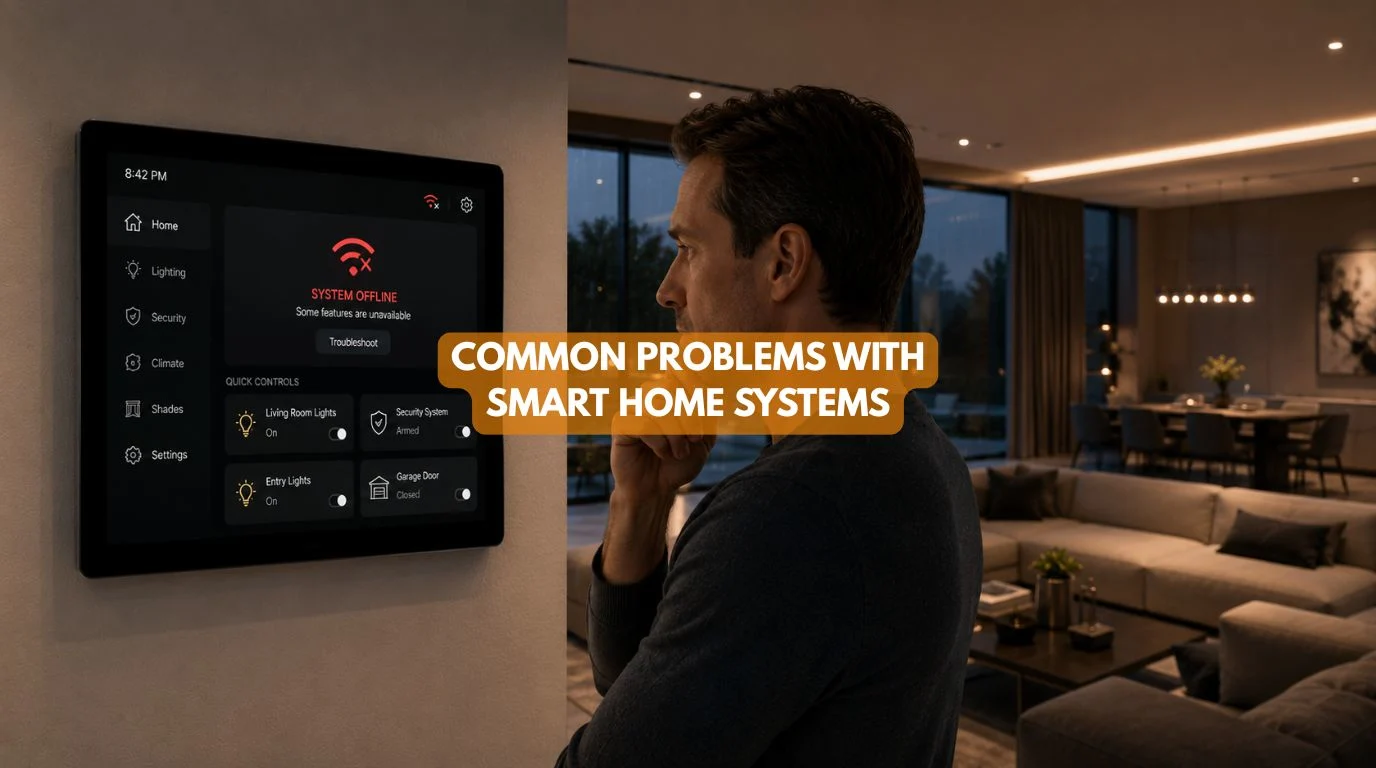
Quick Answer
The common problems with smart home systems include connection failures and device compatibility issues. They also include network limits, battery upkeep, and reliance on the internet. Other issues include software updates, security risks, complex controls, and programming errors. Poor integration between different systems is also common.
You can often reduce these common problems with smart home systems by choosing compatible technology. Design a reliable network. Use the right wired or wireless infrastructure. Have professionals install and commission the system.
Smart home automation systems can make a property more convenient, secure, comfortable, and energy-efficient. But like any technology, smart home systems can experience problems. The important question is not whether problems can occur. It explains why they occur and how effectively the system prevents them.
Common smart home problems range from simple connection issues to harder ones. These include compatibility, programming, networking, and maintenance problems.
Individual devices cause some issues. Others happen because installers used several products from different manufacturers without considering how the products would work together. This matters most in larger homes. The lighting, motorized curtains, security, HVAC, networking, entertainment, and access control systems must communicate with each other.
At Techtastic, we first design the automation setup. Then we choose hardware that fits the property’s needs.
So, if you’re researching common problems with smart home systems, this guide explains what to watch for. It also explains why these problems happen. It shows how professional planning can reduce them.
Quick Summary
The most common smart home problems include:
- Poor Wi-Fi or network connectivity
- Devices becoming disconnected
- Compatibility issues between brands
- Too many separate apps
- Battery maintenance
- Internet dependency
- Software and firmware updates
- Automation programming errors
- Cybersecurity concerns
- Higher installation costs
- Difficult troubleshooting
- Poor planning and installation
Good system design and reliable networking can reduce most of these problems. Use compatible hardware, professional installation, and regular maintenance.
What Are the Common Problems With Smart Home Systems?
The Common Problems With Smart Home Systems usually fall into four broad categories:
Technology Problems
Connectivity, compatibility, software, and hardware failures.
Installation Problems
Poor wiring, incorrect device selection, bad network planning, or improper configuration.
User Experience Problems
Too many apps, confusing controls, or automation that doesn’t behave as expected.
Long-Term Problems
Battery replacement, outdated hardware, discontinued products, and lack of support.
Understanding these categories makes it easier to prevent problems before they become expensive.
1. Connectivity Problems
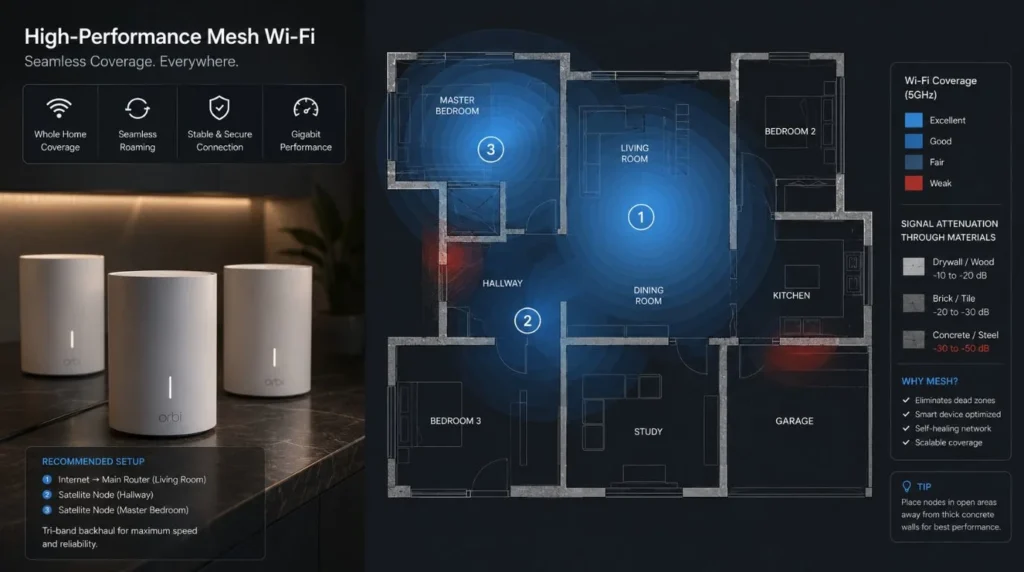
One of the most common issues in smart home platforms is unreliable connectivity. A device may:
- Go offline
- Respond slowly
- Disconnect randomly
- Fail to execute an automation
- Become unavailable through the app
This is particularly common when a home has many wireless devices but inadequate network infrastructure.
Solution
Use:
- Properly positioned Wi-Fi access points
- Structured networking
- Reliable routers and switches
- Appropriate network configuration
- Wired connections for critical systems where practical
For larger homes, networking should be treated as part of the smart home infrastructure rather than an afterthought.
2. Poor Wi-Fi Coverage
Large houses, concrete walls, multiple floors, and long distances can create wireless dead zones. A smart sensor may work perfectly in one room but fail to communicate reliably from another.
This is one of the Common Problems With Smart Home Systems that homeowners often discover only after installation.
Solution
Before installing numerous wireless devices, assess:
- Property size
- Wall construction
- Number of floors
- Access point locations
- Device density
- Network capacity
For larger properties, structured Ethernet infrastructure and professionally designed Wi-Fi can significantly improve reliability.
3. Device Compatibility Problems
Another major issue occurs when products from different brands don’t integrate properly.
For example:
- Lighting from one manufacturer
- Curtains from another
- Security from a third
- HVAC from a fourth
Each system may work independently but provide limited integration with the others.
Solution
Select the automation architecture first. Then choose products that work well within that ecosystem. This is particularly important for premium projects where multiple systems need to operate through common scenes.
4. Too Many Apps
A home shouldn’t require six different apps just to perform basic tasks.
Imagine:
App 1: Lighting
App 2: Curtains
App 3: Security
App 4: AC
App 5: Entertainment
That’s connected technology, but it isn’t necessarily a good user experience.
Better Approach
Use an integrated control platform where practical.
For example: Movie Mode
Curtains close → lights dim → projector activates → audio starts.
One command replaces several separate actions.
5. Battery Maintenance
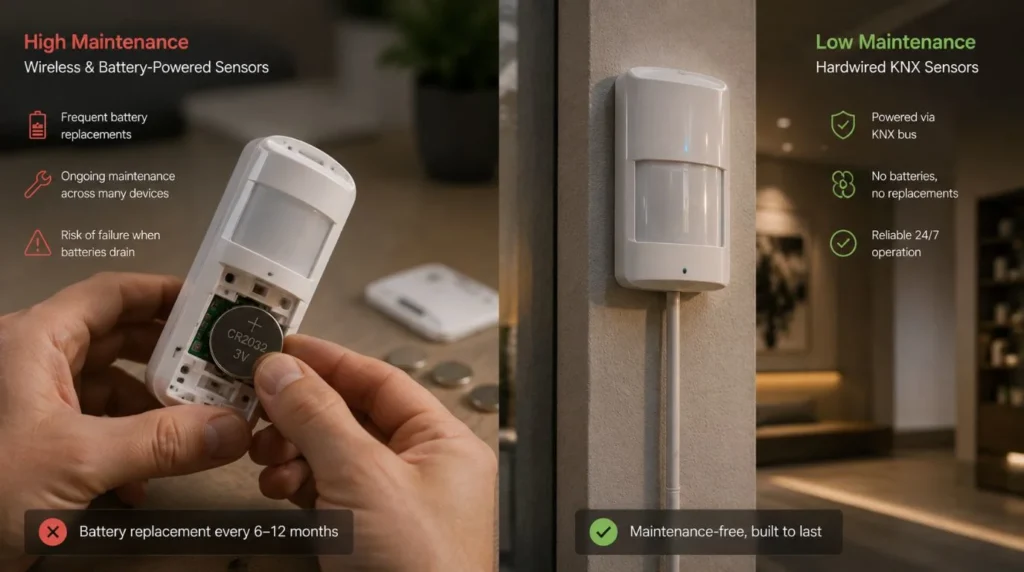
Wireless devices often rely on batteries.
Examples include:
- Motion sensors
- Door sensors
- Window sensors
- Wireless switches
- Battery-powered curtain motors
One battery-powered sensor isn’t difficult to maintain.
A large villa with dozens of wireless devices is different.
Battery management can become an ongoing maintenance task.
Solution
Use wired devices for critical functions when suitable. Use rechargeable or long-life batteries when wireless setup offers a real advantage.
6. Internet Dependency
Some smart devices depend heavily on cloud services.
If the internet connection fails, certain features may stop working or become unavailable remotely. This doesn’t mean every smart home requires constant internet access.
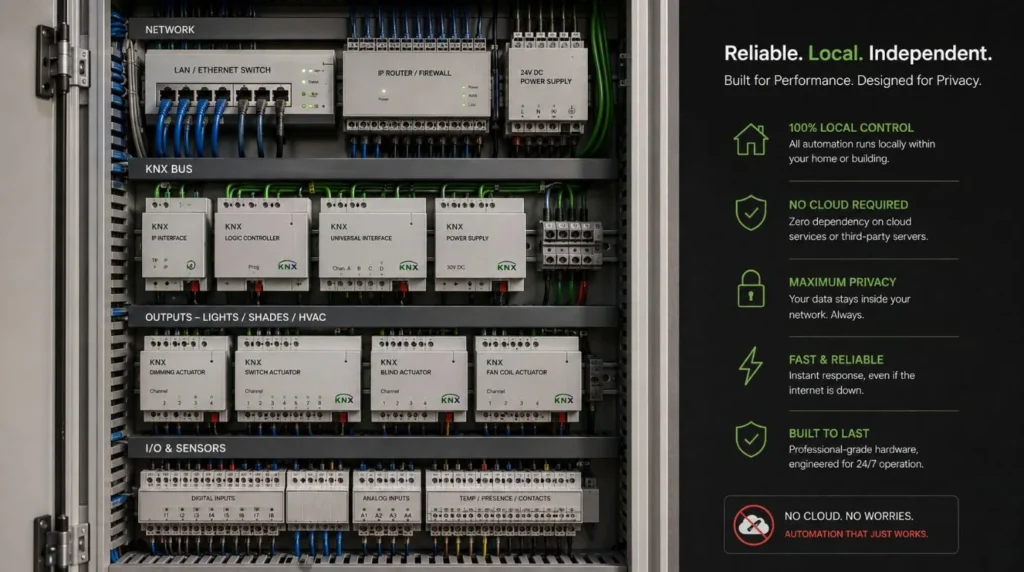
A properly designed system can keep important functions operating locally. For larger residential projects, wired automation technologies like KNX can offer strong local control for suitable uses.
7. Software and Firmware Updates
Connected devices often require updates. Updates can provide:
- Security improvements
- Bug fixes
- New features
- Compatibility improvements
However, updates can occasionally create compatibility problems between devices.
This is one reason you shouldn’t build a smart home from dozens of unrelated products without considering long-term support. Before selecting a product, consider:
- Manufacturer reputation
- Software support
- Integration options
- Replacement availability
- Expected product lifespan
8. Automation Programming Errors
Automation can become frustrating when the system doesn’t behave as expected.
For example: Motion detected → Lights turn on
Sounds simple. But what if the homeowner is watching television at midnight?
The lights suddenly switching on could become annoying. This illustrates an important principle:
Automation should understand context, not simply react to every trigger. Professional programming can incorporate:
- Time
- Occupancy
- Scenes
- User preferences
- Multiple conditions
This creates more natural automation.
9. Security and Privacy Concerns
Smart home systems can connect:
- Cameras
- Door locks
- Security sensors
- Smartphones
- Home networks
- Access control
That means cybersecurity should be part of the design. Basic precautions include:
- Strong passwords
- Secure networks
- Updated firmware
- Reputable manufacturers
- Access controls
- Network segmentation where appropriate
Security shouldn’t be considered only after installation.
10. High Upfront Cost
Professional automation can cost significantly more than purchasing individual smart devices. The investment may include:
- Hardware
- Wiring
- Network infrastructure
- Design
- Installation
- Programming
- Testing
- Commissioning
- Support
This is one of the Common Problems With Smart Home Systems from a budgeting perspective. However, comparing only the device price can be misleading.
A professional system may provide better integration, reliability, scalability, and support.
The right question is: What level of automation provides the best value for this particular property?
11. Poor Installation
Even good products can perform badly when installed incorrectly. Common problems with smart home systems and installations include:
- Incorrect motor sizing
- Poor wiring
- Weak network coverage
- Incorrect sensor placement
- Poor device configuration
- Insufficient electrical infrastructure
This is why professional installation becomes increasingly important as the system becomes more complex.
12. Difficult Troubleshooting
When something stops working, homeowners may not know whether the problem is:
- The device
- Wi-Fi
- Internet
- Power
- Hub
- Software
- Integration
- Programming
This is another reason documentation and professional support matter. A well-designed system should have a clear architecture that makes troubleshooting easier.
Wireless vs Wired Smart Home Problems
| Factor | Wireless | Wired / KNX |
|---|
| Installation | Easier | More involved |
| Retrofit | Excellent | More difficult |
| Wi-Fi Dependence | Potentially higher | Lower for wired functions |
| Battery Dependence | Possible | Lower |
| New Construction | Good | Excellent |
| Large Villas | Selective | Excellent |
| Scalability | Good | Excellent |
| Initial Cost | Often lower | Often higher |
| Infrastructure | Minimal to moderate | More extensive |
Neither technology is automatically better. The correct choice depends on:
- Property type
- Construction stage
- Budget
- Automation scope
- Plans
- Desired reliability
How to Prevent Smart Home Problems
The best way to deal with the Common Problems With Smart Home Systems is to prevent them during planning.
Before Installation
1. Define Your Requirements
Decide what you actually want to automate.
2. Choose the Architecture
Determine whether wired, wireless, or hybrid automation makes sense.
3. Plan Networking
Don’t leave Wi-Fi and network infrastructure until the end.
4. Check Compatibility
Confirm that your lighting, curtains, HVAC, security, and entertainment systems can integrate.
5. Plan for the Future
Leave room for additional automation.
6. Use Professional Programming
Automation logic should reflect actual household routines.
7. Test Everything
Commissioning should include real-world scenarios rather than simply checking whether individual devices turn on.
Representative Example
Illustrative Example: This example shows how to prevent smart home problems. It is not a specific Techtastic client project.
Imagine a luxury villa with:
- 60+ lighting circuits
- Motorized curtains
- HVAC
- Security
- Home theatre
- Multi-room audio
- Smart access control
Instead of installing each system independently, the automation plan is created before construction is completed.
The project includes:
Structured networking
→ Reliable communication
Centralized automation
→ Consistent control
Compatible hardware
→ Better integration
Professional programming
→ Context-aware scenes
Commissioning
→ Testing before handover
The homeowner receives a sophisticated system without needing to understand the underlying technology.
That’s the goal.
Smart Home Problem Prevention Checklist
| Check | Recommended |
|---|
| Network professionally planned | ✅ |
| Devices compatibility checked | ✅ |
| Automation architecture selected | ✅ |
| Battery requirements assessed | ✅ |
| Security configured | ✅ |
| Manual controls retained | ✅ |
| Automation scenes tested | ✅ |
| System documentation available | ✅ |
| Professional support available | ✅ |
| Future expansion considered | ✅ |
Are Smart Home Systems Still Worth It?
Yes.
The existence of Common Problems With Smart Home Systems doesn’t mean homeowners should avoid automation. It means we need to design the system correctly. A well-planned smart home can provide:
- Greater convenience
- Better security
- Improved comfort
- Energy management
- Automated routines
- Centralized control
- Better accessibility
- Long-term scalability
The technology should work quietly in the background.
Our Recommendation
The biggest lesson from the Common Problems With Smart Home Systems is simple: Don’t build your smart home as a collection of disconnected gadgets.
Start with: Lifestyle → Requirements → Architecture → Infrastructure → Devices → Programming → Testing
For a small apartment, wireless automation may be ideal. For a new luxury villa, a wired or hybrid system may provide a stronger long-term foundation.
At Techtastic, the focus is on reliable, intuitive, and scalable automation. It fits the property, not the device count.
Key Takeaways: Common Problems with Smart Home Systems
- The Common Problems With Smart Home Systems include connectivity, compatibility, battery, security, software, programming, and maintenance issues.
- Poor network design can make otherwise good devices unreliable.
- Too many disconnected ecosystems can create a frustrating user experience.
- Battery-powered devices require ongoing maintenance.
- Cloud dependency can affect certain functions during internet outages.
- Professional installation and programming can prevent many common issues.
- Wired KNX systems can be particularly suitable for large new-construction homes.
- Wireless systems can be excellent for retrofits and smaller projects.
- The best smart home puts the homeowner first, not the number of devices.
Frequently Asked Questions
1. What are the most common smart home problems?
The most common problems with smart home systems include connection failures, compatibility problems, weak Wi-Fi, battery care, software updates, cybersecurity risks, coding errors, and limited professional support.
2. Why do smart home devices keep disconnecting?
Poor Wi-Fi coverage, network congestion, interference, router problems, or device limitations can cause frequent disconnections.
3. Can different smart home brands work together?
Yes, but you should verify compatibility before you purchase products. An integrated platform or compatible communication standard can simplify multi-brand installations.
4. Do smart homes stop working when the internet goes down?
It depends on the architecture. Some cloud-dependent devices may lose certain functions, while appropriately designed local automation can continue operating core functions.
5. Are wireless smart homes reliable?
They can be. Reliability depends heavily on network design, device quality, installation, and the scale of the system.
6. Is KNX more reliable than Wi-Fi automation?
KNX can provide advantages for large, permanent residential projects because critical automation can operate through dedicated wired infrastructure. However, wireless systems remain useful for many retrofit applications.
7. Are smart homes expensive to maintain?
Maintenance varies by system. Wireless devices may require battery replacement, while complex integrated systems may require professional servicing or software support.
8. Can you fix common problems with smart home systems after installation?
Technicians can diagnose and fix most issues. Poor infrastructure may still cause problems. These may need extra hardware or rewiring.
9. How can I avoid smart home problems?
Start with a clear automation plan. Select compatible technology. Build reliable networking. Use professional installation. Test automation scenes. Choose a provider with ongoing support.
10. Should I hire a professional smart home installer?
For a few standalone devices, professional installation may not be necessary. For whole-home automation, luxury villas, KNX systems, or multi-system integration, consider professional design and commissioning.
Collaboration Opportunities for Architects & Interior Designers
Many of the Common Problems With Smart Home Systems can be prevented when automation is planned alongside the architecture.
Techtastic works with:
- Architects
- Interior Designers
- Builders
- Developers
- Luxury Villa Developers
- Project Management Consultants
Services include:
- Smart Home Planning
- KNX System Design
- Smart Lighting
- Motorized Curtain Integration
- HVAC Integration
- Smart Security
- Home Theatre Automation
- Structured Networking
- Technical Drawings
- Programming
- Testing & Commissioning
Early collaboration helps ensure that automation infrastructure is coordinated before electrical and interior work is completed.
Areas We Serve
Techtastic provides smart home automation solutions across: Navi Mumbai • Nashik • Lonavla • Sangli
The company also serves projects across the wider Mumbai and Thane region.
Ready to Avoid the Common Problems With Smart Home Systems?
Understanding the Common Problems With Smart Home Systems before investing can save you from expensive mistakes later. The solution isn’t to avoid smart home technology. It’s to choose the right architecture, compatible products, reliable infrastructure, and an experienced installation partner.
At Techtastic, we design smart home solutions around your property, lifestyle, technology requirements, and future expansion plans.
Whether you’re upgrading an apartment or planning a full KNX system for a luxury villa, we can help. We help you build a smart home that is powerful behind the scenes and easy to use each day.
Talk to Techtastic about planning a reliable smart home hub without the unnecessary complexity.
Contact Techtastic
Website: Techtastic Website
Call / WhatsApp: 9769145145
Service Areas: Navi Mumbai • Nashik • Lonavla • Sangli