
A smart home can include lighting, curtains, security, HVAC, entertainment, access control, sensors, and energy management. These systems can work together through automation.
But getting different devices to communicate reliably isn’t always as simple as buying products that are all labeled “smart.”
This is where smart home compatibility issues can appear.
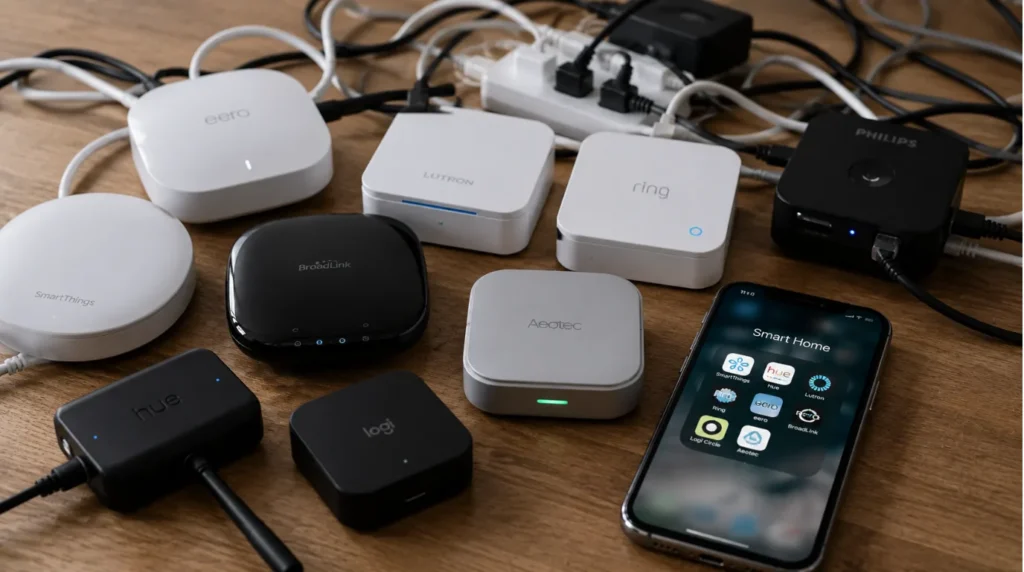
One device may use Wi-Fi, another Zigbee, another Bluetooth, while a professional automation system may use a different communication architecture altogether. Even when two products technically support the same ecosystem, specific features may not work together as expected.
The result can be:
- Multiple apps
- Unreliable automations
- Devices going offline
- Limited functionality
- Duplicate hubs
- Difficult troubleshooting
- Unexpected installation costs
The good news is that most smart home compatibility issues can be reduced significantly through proper planning.
This guide explains common compatibility problems, why they happen, and what homeowners should check. It helps before buying or installing smart home technology.
Quick Summary
The most common smart home compatibility issues involve:
- Different communication protocols
- Incompatible ecosystems
- Limited integrations
- Network problems
- Hub requirements
- Device-specific restrictions
- Cloud dependency
- Wiring limitations
- Poorly planned automation
- Mixing too many brands
How to avoid them:
✓ Plan the complete system before buying devices
✓ Check protocols and integration requirements
✓ Confirm exact device compatibility
✓ Design the network properly
✓ Use compatible products where possible
✓ Consider professional system integration
✓ Plan wired infrastructure early
✓ Test devices before completing the installation
The smartest approach is to design the system first and choose devices second.
Quick Answer
Smart home compatibility issues happen when parts of a smart home cannot work together. Devices, protocols, software platforms, networks, or control systems may not be able to communicate. They may also not be able to share the functions needed for automation.
To avoid them, homeowners should first define their automation needs. They should choose a compatible system design. They should confirm each device works with the system. They should plan the network and wiring and test integrations before the final installation.
What Are Smart Home Compatibility Issues?
Smart home compatibility issues occur when two or more components don’t work together as expected.
For example, you might purchase:
- Smart lights
- Smart curtains
- Smart switches
- Security cameras
- Smart speakers
Each product may work perfectly on its own.
But when you try to create:
“Movie Mode → Curtains close + lights dim + TV starts”
you may discover that one device doesn’t support the required integration.
This is why you should consider compatibility at the system level, not just the individual-device level.
Why Do Smart Home Compatibility Issues Happen?
There are several common causes.
Different Communication Protocols
Devices may communicate using:
- Wi-Fi
- Bluetooth
- Zigbee
- Z-Wave
- KNX
- Thread
- Other proprietary technologies
Supporting different protocols doesn’t automatically make devices incompatible, but it can make integration more complicated.
Different Ecosystems
A product may work well within one ecosystem but offer limited functionality outside it.
Limited Integrations
A device may technically connect to another platform but support only basic commands.
Network Problems
Poor Wi-Fi coverage or network configuration can make compatible devices appear unreliable.
Hardware Limitations
Older switches, motors, controllers, or wiring may not support the functionality required by newer equipment.
1. Protocol Compatibility
Protocol differences are one of the most common sources of smart home compatibility issues.
A homeowner may assume: “They’re both smart devices, so they’ll work together.” That’s not necessarily true.
Before purchasing, determine: What protocol does the device use? Then ask: Does my automation platform support it? And most importantly: Which functions are actually supported?
2. Ecosystem Compatibility
Smart home ecosystems can simplify control, but choosing multiple ecosystems can create unnecessary complexity.
You might have:
- One app for lighting
- Another for curtains
- Another for security
- Another for HVAC
- Another for entertainment
Individually, everything works. Collectively, the experience becomes frustrating. When possible, select products that can operate within a coherent automation architecture.
3. Hub and Controller Problems
Some devices require a dedicated hub or bridge. Others connect directly to a network or automation controller. This can create Smart home compatibility issues when homeowners keep adding products without considering the existing architecture.
Before purchasing a device, check:
- Does it require a hub?
- Which hub?
- Can the hub communicate with the main automation platform?
- Does the integration support two-way control?
- Will advanced features remain available?
A device being “compatible” doesn’t necessarily mean it supports every feature.
4. Network Compatibility
Your smart home network is the foundation for many connected devices. Smart home compatibility issues can sometimes actually be network issues.
Common warning signs include:
- Devices frequently disconnecting
- Slow response
- Delayed automation
- Weak Wi-Fi
- Video streams dropping
- Smart devices becoming unreachable
For larger homes, proper network planning may involve:
- Multiple access points
- Wired Ethernet
- Managed switches
- Appropriate network capacity
- Reliable internet infrastructure
A poorly designed network can make even compatible products behave badly.
5. App and Software Compatibility
Software is another potential source of smart home compatibility issues. A device may work today but receive an update that changes its integration behavior. Similarly, an older product may eventually lose support.
Before committing to a platform, consider:
- Manufacturer support
- Update history
- Integration ecosystem
- Local vs cloud operation
- Upgrade options
- Long-term availability
This is especially important for whole-home automation.
6. Wired vs Wireless Compatibility
| Factor | Wired Automation | Wireless Automation |
|---|---|---|
| Infrastructure | More planning | Less wiring |
| Reliability | Strong when properly designed | Network-dependent |
| Retrofit | More difficult | Easier |
| New Construction | Excellent | Good |
| Battery Dependence | Lower | Potentially higher |
| Large Projects | Strong option | Requires careful network planning |
| Future Expansion | Highly scalable | Depends on ecosystem |
Neither approach is automatically better for every project when solving smart home compatibility issues. The right choice depends on the property and automation requirements.
7. KNX and Professional Automation
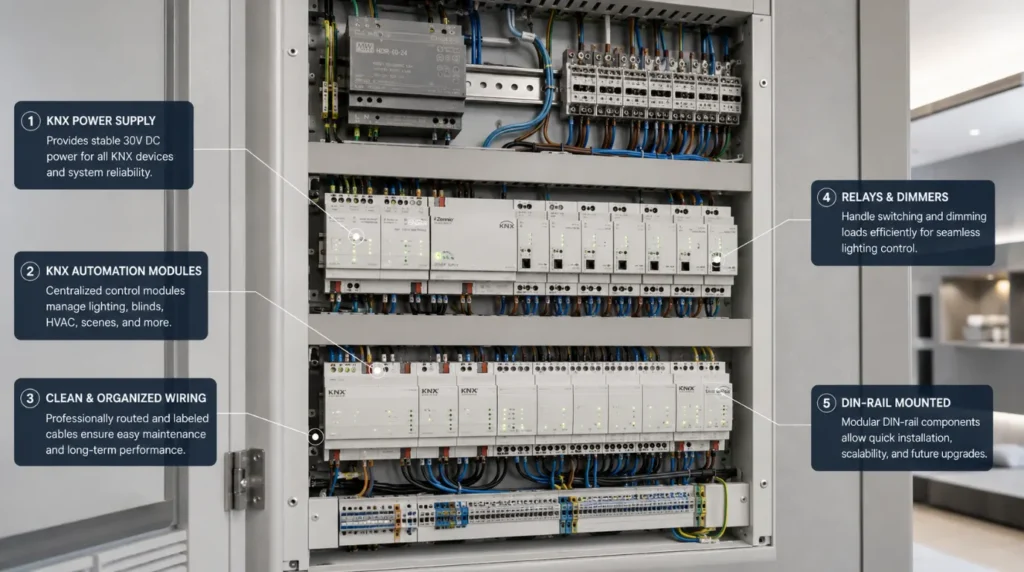
For larger homes and new luxury builds, a professional wired automation system like KNX can help. It creates a structured setup.
Instead of treating every device as an independent smart gadget, the system can be designed around:
- Lighting
- Sensors
- HVAC
- Curtains
- Security
- Controls
- Other building systems
This approach can reduce the need to build a home around dozens of unrelated consumer applications.
However, KNX integration still requires careful system design. Evaluate a KNX-compatible device based on the actual function it needs to perform within the project.
8. Cloud Dependency
Another source of smart home compatibility issues is dependence on cloud services. Some devices require an internet connection or a manufacturer’s cloud platform for certain features.
Ask:
- What happens if the internet goes down?
- Can basic controls operate locally?
- Is the device dependent on a manufacturer’s server?
- What happens if the company discontinues the product?
For important functions such as lighting, security, and access control, understanding local operation can be particularly important.
How to Avoid Smart Home Compatibility Issues
The best solution is planning before purchasing.
Step 1: Define Your Requirements
List what you want to automate:
- Lighting
- Curtains
- HVAC
- Security
- Entertainment
- Access
- Energy
Step 2: Choose the Architecture
Decide whether the project needs:
- Wired
- Wireless
- Hybrid
Step 3: Select the Automation Platform
Choose the central architecture before buying individual devices.
Step 4: Check Exact Compatibility
Don’t rely on statements such as: “Works with smart homes.” Check the exact integration requirements.
Step 5: Plan the Network
Make sure the infrastructure can support the number of connected devices.
Step 6: Test Critical Integrations
Before finalizing the system, test the automations that matter most.
Smart Home Compatibility Checklist
Use this checklist before buying a smart device to solve your smart home compatibility issues.
| Question | Check |
|---|---|
| What protocol does it use? | ☐ |
| Does it require a hub? | ☐ |
| Is the hub compatible? | ☐ |
| Does my automation platform support it? | ☐ |
| Are all required features supported? | ☐ |
| Does it require cloud connectivity? | ☐ |
| Can it operate locally? | ☐ |
| Is the network adequate? | ☐ |
| Is the product actively supported? | ☐ |
| Can it be replaced or upgraded later? | ☐ |
This simple checklist can prevent many smart home compatibility issues before they become expensive installation problems.
Compatibility Issues With Motorized Curtains
Motorized curtains deserve special attention.
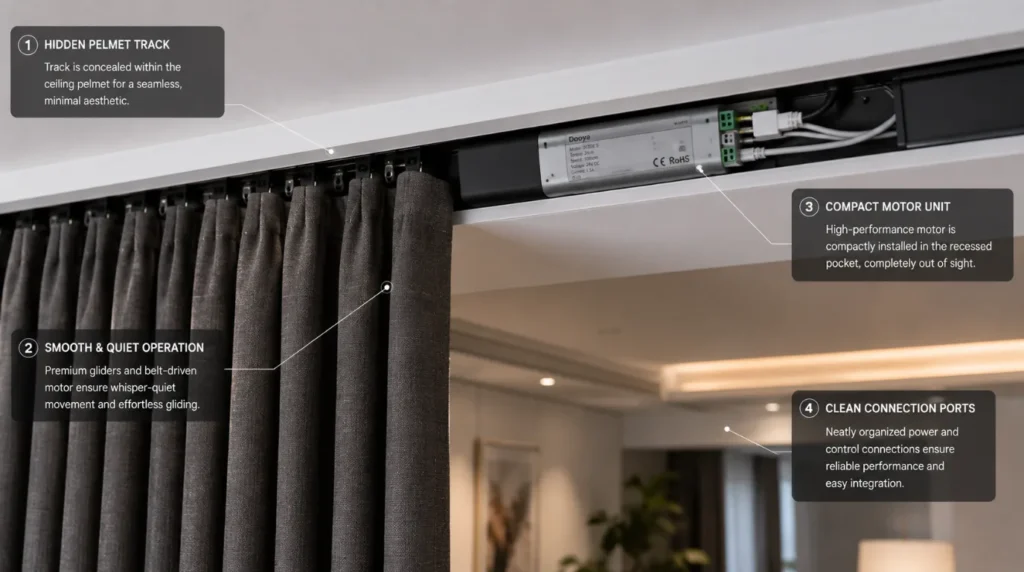
A curtain motor may need to communicate with:
- Lighting
- Smart home controllers
- Voice assistants
- Remote controls
- Sensors
- Schedules
Before purchasing a motor, confirm:
- Control protocol
- Smart home integrations
- Motor controller requirements
- Wired/wireless connectivity
- Curtain weight capacity
- Manual override
- Local operation
For large luxury homes, it is usually best to choose the curtain motor as part of the full automation plan.
Compatibility Issues With Smart Lighting
Lighting can become complicated when mixing:
- Smart bulbs
- Smart switches
- Dimmers
- Sensors
- Central controllers
For example, a smart bulb may not be the best choice for every lighting circuit.
A professional lighting-control system may use centralized dimming or automation instead. The correct solution depends on the home’s electrical design and desired control experience.
Compatibility Issues With Smart Security
Security systems require additional caution.
Check whether:
- Cameras integrate with your platform
- Door sensors communicate correctly
- Smart locks support your preferred control system
- Notifications work reliably
- Remote access is secure
- Important functions work locally
Security should not depend on an untested integration simply because two products advertise compatibility.
Common Mistakes
Buying Devices First
This is one of the biggest causes of smart home compatibility issues.
Mixing Too Many Ecosystems
More platforms usually mean more complexity.
Ignoring Network Infrastructure
A weak network can undermine an otherwise well-designed system.
Assuming “Compatible” Means Fully Integrated
A product may support only limited commands.
Ignoring Future Expansion
Your system should accommodate future additions where practical.
Choosing Products Only by Price
Cheap hardware can become expensive if it needs to be replaced because it doesn’t integrate properly.
Installing Without Testing
Always test important scenes before considering the system complete.
Representative Example
Illustrative Example: This scenario demonstrates a typical compatibility-planning approach and is not presented as a specific Techtastic client project.
Imagine a homeowner wants:
- Smart lighting
- Motorized curtains
- HVAC
- Security
- Home theatre
They initially purchase products from several different brands. Each product works individually. But the desired “Movie Mode” cannot control everything from one scene.
Instead of replacing the whole system, a better approach would be to set up the automation architecture first. Then, select compatible products to match it.
The lesson is simple: Design the ecosystem before buying the devices.
Are Smart Home Compatibility Issues Avoidable?
Not always.
Technology changes, manufacturers update software, and products eventually reach the end of their support lifecycle. However, good system design can significantly reduce the risk.
The most important principles are: Plan → Standardize → Verify → Integrate → Test.
This is particularly important for larger homes where replacing one incompatible component may affect multiple connected systems.
Our Recommendation
The best way to avoid smart home compatibility issues is to stop thinking of your smart home as a collection of individual devices. Think of it as one system.
Before purchasing anything, establish:
- What you want to automate
- How the systems need to interact
- Which architecture fits the property
- What network infrastructure is required
- Which devices support the required integrations
For a small retrofit, this might be relatively straightforward. For a luxury villa with KNX, a professional system design is very valuable. It helps integrate lighting, HVAC, motorized curtains, security, and entertainment.
At Techtastic, the focus is on designing integrated smart home systems rather than simply installing disconnected smart products.
Key Takeaways
- Smart home compatibility issues usually arise from differences in protocols, ecosystems, hubs, networks, software, or hardware.
- “Smart” does not automatically mean compatible.
- Check exact device-level integrations before purchasing.
- A reliable network is essential for many wireless systems.
- Wired and hybrid architectures can provide strong options for larger projects.
- KNX can provide a structured foundation for professional home automation.
- Check whether important functions work locally or depend on cloud services.
- Don’t mix multiple ecosystems without a clear reason.
- Test critical automation scenes before final installation.
- The best strategy is to design the system first and select products second.
Frequently Asked Questions
1. What are Smart Home Compatibility Issues?
A. Smart home compatibility issues occur when different smart devices, platforms, protocols, networks, or controllers cannot communicate or provide the required functions together.
2. Why don’t all smart devices work together?
A. Different manufacturers may use different communication protocols, ecosystems, hubs, software platforms, and integration methods.
3. How can I avoid Smart Home Compatibility Issues?
A. Plan your automation architecture first, select a compatible platform, verify each device’s exact integration capabilities, and test important systems before installation.
4. Does Wi-Fi make smart devices compatible?
A. No. Wi-Fi is a communication method, not a guarantee that two products can communicate or integrate.
5. Is Matter a solution to smart home compatibility?
A. Matter aims to improve how smart home devices work together across ecosystems. However, support still depends on the device, platform, and feature.
6. Can KNX systems integrate with other smart home technologies?
A. Yes. You can link KNX installations with other systems. The exact setup depends on the chosen gateways and controllers. It also depends on the supported features.
7. Can incompatible smart devices be connected through a hub?
A. Sometimes. A compatible hub or gateway can bridge some technologies, but it does not ensure every feature is available.
8. Should I use products from one brand?
A. Not necessarily. A multi-brand system can work well when you select the products around a compatible architecture.
9. Can compatibility problems appear after installation?
A. Yes. Software updates, discontinued cloud services, network changes, and device failures can introduce new problems.
10. Should I hire a professional smart home installer?
A. For simple individual devices, you may not need one. For whole-home automation, KNX, multi-system integration, and luxury residential projects, professional design and commissioning can significantly reduce compatibility risks.
Collaboration Opportunities for Architects & Interior Designers
Preventing smart home compatibility issues starts during the design phase.
Techtastic can collaborate with:
- Architects
- Interior Designers
- Builders
- Developers
- Luxury Villa Developers
- Project Management Consultants
Services include:
- Smart Home System Design
- KNX System Design
- Smart Lighting Integration
- Motorized Curtain Integration
- HVAC Integration
- Smart Security
- Home Theatre Automation
- Structured Networking
- Technical Drawings
- Programming
- Testing & Commissioning
Early coordination allows the automation architecture, electrical system, networking, and interior design to work together from the beginning.
Areas We Serve
Techtastic provides smart home automation solutions across:
Navi Mumbai • Nashik • Lonavla • Sangli
The company also serves projects across the wider Mumbai and Thane region.
Build a Smart Home Without Compatibility Issues
Smart home compatibility issues are often preventable. The biggest mistake is buying individual devices first and trying to make them work together afterward.
Instead: Define your goals → Choose the architecture → Plan infrastructure → Verify compatibility → Install → Test. This approach can reduce unnecessary equipment, simplify control, improve reliability, and make future expansion easier.
Whether you’re building a luxury villa, renovating an apartment, or upgrading your home, Techtastic can help. We can help you choose and integrate the right automation technology for your property.
Talk to Techtastic about designing a smart home system where you select devices to work together from the start.
Contact Techtastic
🌐 Website: Techtastic Website
📞 Phone: 9769145145
📍 Service Areas: Mumbai • Navi Mumbai • Pune • Lonavala • Nashik • Sangli
Want to reduce energy waste and make your home more efficient? Explore our Smart Home Energy Management in Navi Mumbai: 7 Best Tips for practical ways to save energy with smart technology.