
Summary
To efficiently execute motorized curtains troubleshooting when your drapes won’t close, immediately check for physical track obstructions, verify power supply continuity, and clear the corrupt limit switch memory. Unlike mass-market wireless smart shades that fail due to Wi-Fi drops, dead batteries, or unresponsive cloud servers, professional automated drapery systems use hardwired logic. Isolating mechanical and physical friction from electrical control failure involves checking the manual bypass, verifying local actuator bus communication, and resetting the motor’s internal encoder. This systematic approach resolves closure failures safely without burning out delicate internal electronic windings or damaging luxury fabrics.
How Do You Troubleshoot Motorized Curtains That Won’t Close?
The Automation Standstill: When Luxury Fabrics Refuse to Move
Nothing shatters the experience of a high-end master suite faster than a multi-lakh set of custom silk drapes frozen halfway open. When I inspect residential technical faults across premium estates in Navi Mumbai, Nashik, or Lonavla, frozen motorized window treatments are a frequent issue. Homeowners often try to forcefully yank the fabric shut, which can permanently warp the internal aluminum drive belts, strip the motor’s brass drive gears, or rip the custom drapery pleats right off their carriers.
When your window shades stop responding, you are dealing with a clear conflict between mechanical movement and system logic, making structured motorized curtains troubleshooting essential. Mass-market wireless smart curtain setups frequently drop connection because reinforced concrete walls block their radio signals.
However, even with industrial-grade, hardwired installations, issues like physical track tension, electrical grid surges, or misconfigured electronic limits can bring your system to a halt. Finding the root cause requires systematic, step-by-step diagnostic troubleshooting.
What is The First Thing to Check When a Motorized Curtain Stops Responding?
The first thing to check when a motorized curtain stops responding is the physical track pathway for any mechanical obstructions, fabric snags, or carrier misalignments. Isolating mechanical resistance from an electrical issue prevents you from accidentally burning out the motor’s internal electronic components while troubleshooting.
Testing the Manual Touch-Motion Bypass
Most premium drapery motors (such as Somfy, Glydea, or Lutron) feature an internal mechanical clutch designed for manual override during power outages. As an initial step in your motorized curtains troubleshooting sequence, give the edge of your curtain fabric a gentle, steady pull of about two inches in the closing direction. If the motor suddenly wakes up and takes over the movement, your electrical paths are completely fine; the system simply failed to register a wireless command or requires its sensitivity recalibrated.
Inspecting the Master Drive Belt and Gliders
If the fabric refuses to budge when pulled gently, grab a stable step ladder and inspect the internal channel of your recessed ceiling pocket. Look closely for loose drapery pins jammed inside the aluminum profile, twisted master carriers, or overlapping sheer fabrics caught in the pulley mechanism. A single stuck carrier creates massive mechanical friction, forcing the motor’s safety sensors to instantly cut power to prevent an electrical fire. Correctly identifying these physical blocks is a cornerstone of effective motorized curtains troubleshooting.
How do You Diagnose Power and Data Failure in Automated Drapes?
You execute advanced motorized curtains troubleshooting for power and data failures by checking the status LEDs on your centralized electrical panel actuators and measuring the voltage continuity across your low-voltage data cables. This step determines whether your motor is suffering from a complete loss of mains current or a breakdown in its control network signals.
[Centralized Power Board] ───(Check Circuit Breaker)───> [Panel Actuator LED Status]
│
(Verify Bus Line Voltage)
│
▼
[Motor Low-Voltage Interface]
Reading Panel Actuator Error Codes
Before adjusting any wiring at the window, open your home’s central electrical distribution board. Locate the dedicated blind/shutter actuator module connected to that room’s green bus cable. If the module’s channel status LED is flashing rapidly or showing a red fault light, your motorized curtains troubleshooting process has successfully pinpointed an overcurrent issue or a broken physical cable connection between the panel and the window pocket.
Verifying Low-Voltage Bus Integrity
For hardwired setups, verify that your control signals are successfully reaching the motor head. A stable system uses a low-voltage shielded communication wire to send open and close commands. Using a standard digital multimeter at the motor’s terminal block, check that the bus line is maintaining its constant operating current; a dropped or shorted data line will cause the motor to ignore all keypad and voice instructions.
Why do Motorized Curtains Lose their Automatic Closing Limits?
A major phase of motorized curtains troubleshooting involves diagnosing why motors lose their automatic closing limits. This typically happens due to volatile voltage fluctuations from the local power grid or an accidental manual pull that overrides the motor’s internal digital encoder memory. When this internal electronic map becomes corrupted, the motor forgets exactly where the window track ends and stops moving early as a built-in safety precaution.
The Impact of Grid Recovery Surges
In coastal or rural luxury markets, the abrupt voltage spikes that occur when municipal grid power returns after a blackout can scramble unshielded digital memory. The sudden current rush distorts the small flash memory chip inside the motor head, erasing its pre-set open and close positions. To eliminate this issue long-term, we build sequence-staggering power recovery logic right into our centralized panels to buffer your electronics from these surges, drastically reducing the need for emergency motorized curtains troubleshooting.
Clearing and Resetting the Internal Encoder Memory
When the electronic limit memory gets corrupted, you must execute a full factory hardware reset to restore proper operation. This process is a vital skill in motorized curtains troubleshooting and involves a specific sequence of actions:
[Hold Open + Close Buttons] ──> [Wait for Curtain to Jog] ──> [Run to Exact Close Point] ──> [Confirm Memory Lock]
Once the fabric completes its calibration cycle, the motor registers its precise physical travel distance down to the millimeter, preventing it from stopping short in the future.
Diagnostic Matrix: Identifying the Cause of Smart Curtain Failures
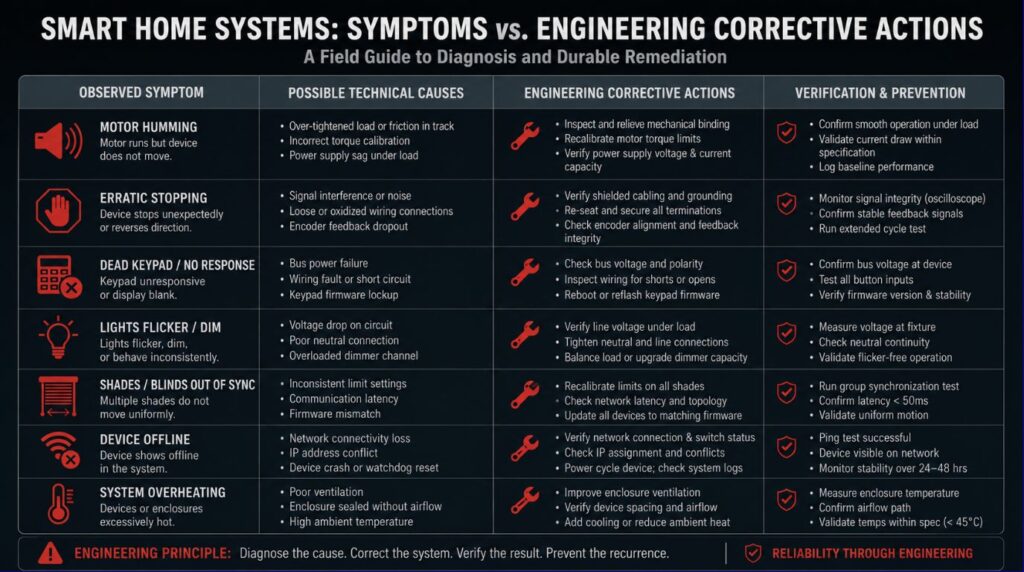
| Observed System Symptom | Potential Root Cause | Corrective Engineering Action |
| The curtain closes halfway and then reverses automatically. | Mechanical track jam or stripped internal drive gears. | Clear track obstructions; inspect the aluminum belt tension during motorized curtains troubleshooting. |
| Power surge, memory corruption, or loose end-stops. | High friction or corrupted mid-point limit memory. | Clean track channels; recalibrate electronic limits. |
| No sound, no movement, and keypad LEDs are dead. | Tripped panel breaker or broken bus cable line. | Reset the circuit breaker; test low-voltage wire continuity. |
| Works via wall keypad but ignores voice commands. | IP gateway lag or local network router disconnect. | Reboot the local area network server; verify IP bridge data. |
| Stops at random points every time it runs. | Power surge, memory corruption, or loose end-stops. | Perform a full factory motor reset and reprogram limit boundaries. |
Protecting Luxury Window Treatments Against Voltage Spike Failures
In premium Indian residential developments, the most common source of motor failure isn’t wear and tear—it is dirty electrical power. Unannounced monsoon power cuts and sudden grid drops create high-voltage transients that degrade the delicate internal power supplies of imported electronic tracks.
I eliminate this structural risk and simplify your long-term motorized curtains troubleshooting by engineering centralized, panel-level power isolation loops. Instead of connecting your luxury tracks to standard, unshielded wall lines, our systems route power through dedicated isolation relays and industrial surge suppressors. This setup isolates your window motors from grid fluctuations, ensuring they remain responsive and operate smoothly for decades.
Elevating Your Estate Design From Fragile Technology to an Enduring Legacy
A beautifully designed estate should offer a peaceful, seamless sanctuary for your family. If your modern home conveniences frequently require you to climb ladders to reset frozen curtain tracks, deal with dropped wireless connections, or worry about burning out expensive equipment, your automation has become a daily hassle rather than a luxury.
At Techtastic, I do not look at window automation as a collection of superficial retail plug-ins or temporary gadgets. I design robust, hardwired systems using international standards to transform your property’s mechanics into an invisible, self-optimizing asset. We take care of the complex low-voltage wiring pathways, physical panel dynamics, and precise motor calibrations so you can stop troubleshooting your home and finally start enjoying true environmental comfort.
🤝 The Partnership Corner
- For Luxury Estate Owners: We join your project during the raw civil shell phase to design an unshakeable, hardwired drapery and power infrastructure, removing the need for frequent motorized curtains troubleshooting, system lag, and battery hassles down the line.
- For Premium Architects & Interior Designers: We coordinate seamlessly with your construction teams, providing detailed electrical wiring schematics, exact pocket dimensions, and panel wire maps to keep your interior design absolutely flawless.
Let’s build a digital foundation engineered to endure.
📞 Call/WhatsApp: 9769145145
📍 Engineering Premium Reliability Across: Navi Mumbai | Nashik | Lonavla | Sangli
Technical FAQs on Motorized Curtains Troubleshooting
Q: Can a motorized curtain track be pulled manually during motorized curtains troubleshooting if the system freezes?
A: Yes, provided your system uses premium architectural drapery motors equipped with a built-in mechanical manual clutch feature. This safety mechanism allows you to pull the fabric gently by hand during a power failure or while conducting motorized curtains troubleshooting without stripping the motor’s internal drive gears or warping the aluminum track belts.
Q: Why do my smart curtains stop moving or reverse direction on their own halfway through closing?
A: This automatic reversal is a built-in safety function triggered by the motor’s electronic resistance sensors. If dirt accumulation inside the track increases mechanical friction past a specific threshold, the system halts. Resolving this during motorized curtains troubleshooting requires cleaning the track channels to clear the physical resistance tripping the sensor.
Q: How do you reset the electronic closing limits on a hardwired automation curtain motor?
A: To reset the electronic closing limits, you must clear the motor’s internal encoder memory using a specific key sequence on your wall keypad or by pressing the physical programming button on the motor head. Once cleared, you manually drive the curtain to its exact open and closed points, allowing the local microprocessor to map and store the precise travel distance down to the millimeter. Hardwired systems require virtually zero ongoing motorized curtains troubleshooting because they eliminate the primary failure points of wireless hardware