
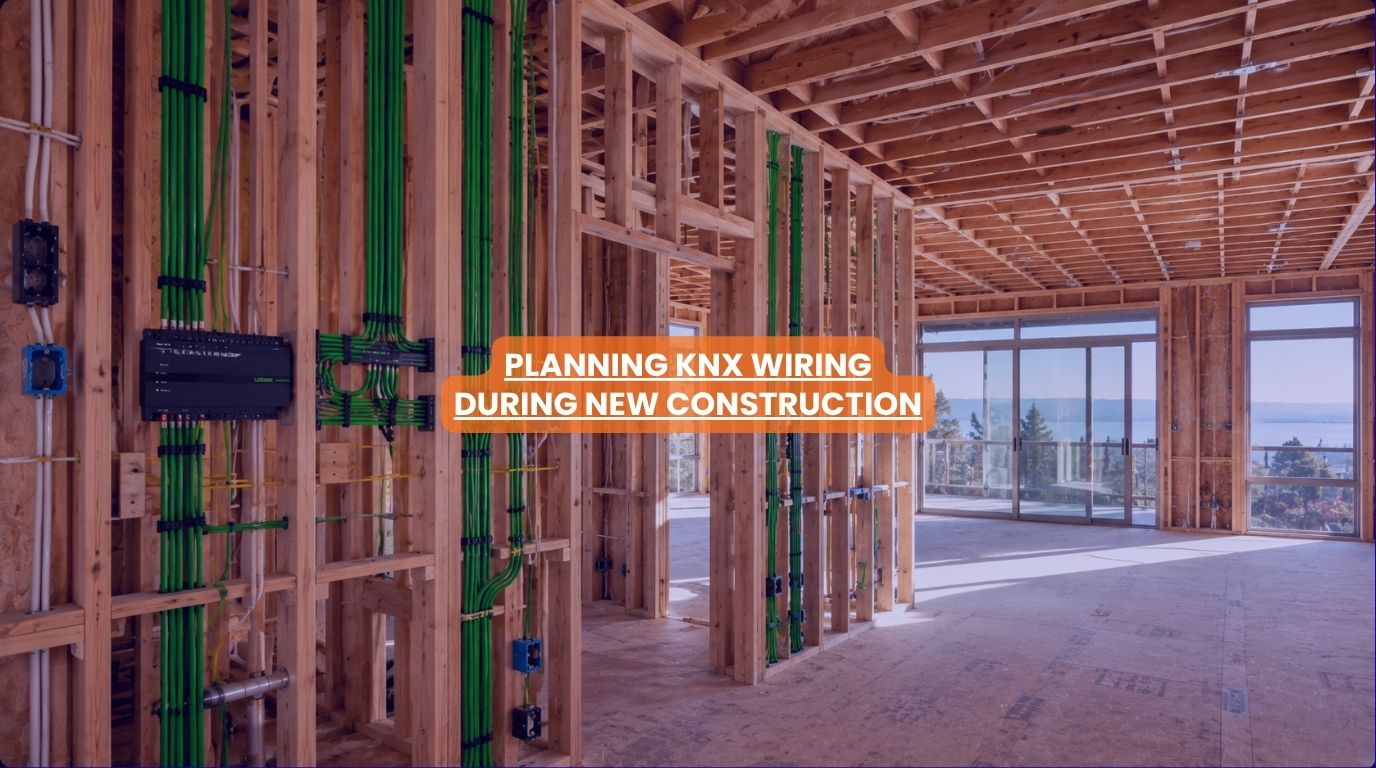
How to Plan KNX Wiring During New Construction?
One of the biggest mistakes homeowners make with home automation isn’t choosing the wrong technology; it’s planning too late. By the time walls are finished, ceilings are closed, and electrical work is complete, many opportunities for efficient smart home integration have already been lost. That’s why one of the most important decisions during construction is planning the automation infrastructure from the beginning.
At Techtastic, we often tell homeowners: “The smartest part of a smart home isn’t the technology you see—it’s the infrastructure hidden behind the walls.”
For homeowners considering KNX home automation, early KNX home wiring planning is one of the most valuable investments they can make. A well-designed KNX infrastructure creates a foundation that supports lighting control, climate automation, security systems, motorized curtains, entertainment systems, and future smart home technologies for many years.
Let’s explore how to plan KNX home wiring correctly during new construction.
Summary
The best time to install KNX home automation wiring is during new construction. Proper planning allows homeowners to create a future-ready smart home infrastructure that supports lighting control, climate automation, security systems, motorized curtains, audio-visual systems, and future technology upgrades. Effective KNX home wiring design focuses on scalability, centralized control, device locations, network infrastructure, and long-term flexibility, helping homeowners avoid costly retrofits later.
Quick Answer
If you’re building a new home, KNX home wiring should be planned before electrical installation begins. A properly designed KNX home automation system requires dedicated bus cabling, strategic device placement, centralized distribution planning, and infrastructure that supports future expansion. Early planning helps reduce costs, improve reliability, and create a smart home that can evolve as technology changes.
Why KNX Home Wiring Matters
Unlike many wireless smart home products, KNX is designed as a professional automation infrastructure.
The system relies on dedicated communication between devices throughout the property.
This provides:
- Greater reliability
- Faster communication
- Better scalability
- Long-term flexibility
- Reduced dependence on cloud services
Because much of the infrastructure is installed inside walls, proper planning is critical.
Why New Construction Is the Ideal Time for KNX Installation
Installing KNX during construction offers several advantages.
Lower Installation Costs
Cabling can be installed before walls are finished.
Greater Design Flexibility
Automation can be integrated seamlessly into the architecture.
Easier Future Expansion
Additional automation features can be added later.
Cleaner Installation
No need for major renovations or wall modifications.
Better Long-Term Value
Infrastructure becomes part of the building itself.
The earlier automation planning begins, the better the outcome.
Step 1: Define Your Automation Goals
Before planning wiring routes, identify what the smart home should control.
Common KNX applications include:
Lighting Control
- Dimming
- Scene creation
- Occupancy-based lighting
Climate Automation
- Air conditioning
- Heating
- Temperature zones
Security Systems
- Motion sensors
- Access control
- Alarm integration
Motorized Curtains
- Daylight management
- Privacy automation
Entertainment Systems
- Home theatres
- Multi-room audio
Knowing your goals helps determine infrastructure requirements.
Step 2: Plan for Future Expansion
One of KNX’s greatest strengths is scalability.
Even if you don’t automate everything immediately, infrastructure should support future additions.
Common future upgrades include:
- Additional lighting circuits
- Smart security systems
- EV charging integration
- Energy management
- Solar integration
- Advanced automation scenes
Future-proofing during construction is significantly less expensive than retrofitting later.
Step 3: Identify Key Device Locations
KNX planning begins with understanding where devices will be installed.
Examples include:
Keypads
Near entrances and major rooms.
Sensors
Occupancy detection and environmental monitoring.
Touch Panels
Centralized control locations.
Motorized Curtain Controllers
Near windows and curtain systems.
Security Devices
Strategic protection points.
Device placement directly influences wiring requirements.
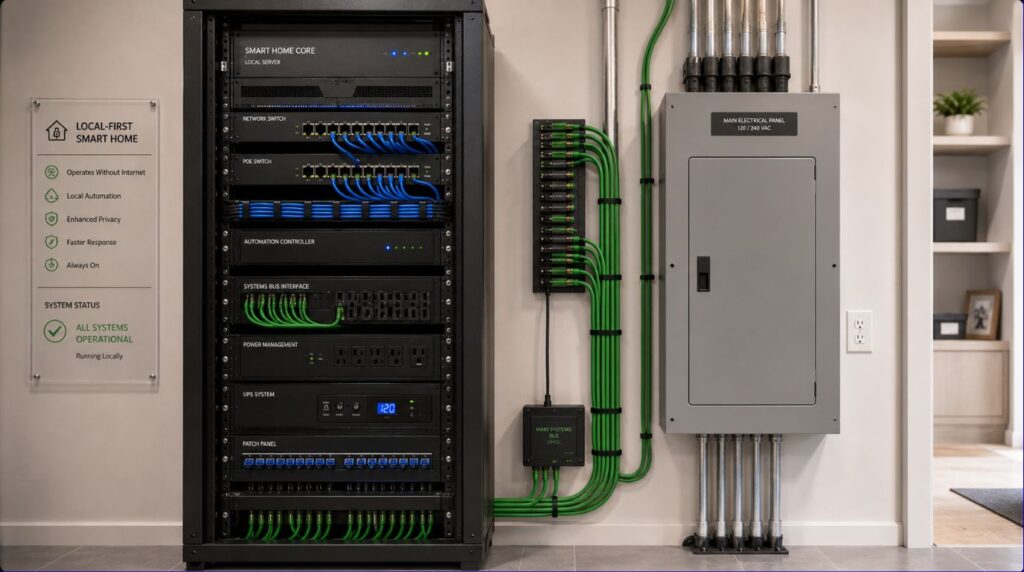
Step 4: Design a Centralized Distribution Strategy
Most KNX projects include centralized electrical panels.
Benefits include:
- Easier maintenance
- Cleaner installation
- Simplified upgrades
- Better system management
The distribution board becomes the heart of the automation system.
Proper space allocation is essential.
Step 5: Plan KNX Bus Cable Routes
The KNX bus cable is the communication backbone of the system.
It connects:
- Sensors
- Switches
- Keypads
- Controllers
- Automation devices
Early routing planning helps avoid conflicts with:
- Electrical wiring
- Plumbing
- HVAC systems
Coordination between trades is extremely important.
Step 6: Integrate Networking Infrastructure
Many homeowners focus exclusively on automation wiring.
However, networking is equally important.
A modern smart home often requires:
- Enterprise-grade WiFi
- Structured cabling
- Network racks
- Internet connectivity planning
Strong networking improves:
- Remote access
- Mobile control
- Security systems
- Entertainment systems
Smart home reliability starts with infrastructure.
Step 7: Consider Lighting Automation Early
Lighting is typically one of the largest KNX applications.
Planning should include:
Circuit Design
Support flexible control.
Dimming Requirements
Enable ambience and efficiency.
Scene Creation
Support multiple lighting modes.
Future Flexibility
Allow room functions to evolve.
Lighting planning is much easier before electrical installation begins.
Step 8: Coordinate With Architects and Interior Designers
KNX is most effective when integrated into the overall design process.
Automation planning influences:
- Switch locations
- Touch panel placement
- Lighting layouts
- Curtain systems
- AV infrastructure
Early collaboration creates cleaner and more elegant outcomes.
Common KNX Home Wiring Mistakes
Planning Too Late
The most common mistake.
Not Allowing for Expansion
Technology needs to evolve.
Underestimating Panel Space
Future devices require room.
Ignoring Networking Requirements
Automation and networking should be planned together.
Treating Automation as an Add-On
The best smart homes integrate automation into the building design itself.
KNX vs Retrofitting Later
| During Construction | After Construction |
| Easier installation | More complex |
| Lower labor costs | Higher labor costs |
| Minimal disruption | Possible renovation work |
| Better infrastructure planning | Infrastructure limitations |
| Future-ready design | Upgrade constraints |
| Cleaner integration | More compromises |
Planning early almost always provides better results.
What Should Be Included in a Future-Ready KNX Infrastructure?
A modern KNX-ready home should consider:
- Lighting automation
- Climate control
- Motorized curtains
- Security systems
- Structured networking
- Access control
- Energy monitoring
- EV charging readiness
- Solar integration
- Future automation expansion
The goal is flexibility rather than immediate implementation of every feature.
Why It Matters for Modern Homes
Today’s homeowners expect:
- Centralized control
- Energy efficiency
- Enhanced security
- Connected living
- Future compatibility
KNX infrastructure helps support all of these goals.
The decisions made during construction often determine how easily a home can adapt to future technologies.
Our Perspective at Techtastic
At Techtastic, we encourage homeowners to think of KNX home wiring as a long-term infrastructure investment rather than a technology purchase.
When planning new construction projects, we typically prioritize:
- Scalability
- Reliability
- Centralized control
- Structured networking
- Future expansion capabilities
We’ve seen many homeowners regret not installing automation infrastructure during construction because retrofitting later often costs significantly more.
The smartest homes are usually the ones that were planned before construction—not after.
Collaboration Opportunities for Developers, Architects & Interior Designers
The best KNX projects begin long before electrical work starts.
At Techtastic, we collaborate with:
- Architects
- Interior designers
- MEP consultants
- Luxury home builders
- Residential developers
- Hospitality consultants
Smart Infrastructure Planning
Design homes that are ready for future technology.
KNX System Design
Create scalable automation ecosystems.
Lighting & Automation Integration
Coordinate technology with architecture.
Structured Networking Design
Support reliable connected living.
Luxury Residential Projects
Deliver future-ready smart homes.
Hospitality & Commercial Developments
Implement professional-grade automation platforms.
Early collaboration dramatically improves long-term outcomes.
Key Takeaways on KNX Home Wiring
- New construction is the best time to install KNX home wiring.
- Early planning reduces costs and installation complexity.
- KNX infrastructure should support future expansion.
- Lighting, security, climate control, and networking should be planned together.
- Centralized distribution improves system management.
- Proper KNX home wiring design creates a future-ready smart home foundation.
Frequently Asked Questions
1. When should KNX home wiring be planned?
A: Ideally, during the architectural and electrical planning phase before construction progresses.
2. Is KNX home wiring different from standard electrical wiring?
A: Yes. KNX uses dedicated communication infrastructure in addition to conventional electrical wiring.
3. Can KNX be added later?
A: Yes, but installation is generally easier and more cost-effective during construction.
4. How much future expansion should I plan for?
A: As much as practical. Future-ready infrastructure significantly reduces upgrade costs.
5. Does KNX home wiring require special cabling?
A: Yes. KNX systems use dedicated bus cables for communication between devices.
6. Should networking be planned with KNX home wiring?
A: Absolutely. Smart home networking is a critical part of overall system performance.
7. Can KNX support lighting and security together?
A: Yes. KNX can integrate lighting, security, climate control, curtains, and many other building systems.
8. Is KNX home wiring worth planning during construction?
A: For homeowners interested in long-term smart home capabilities, early KNX home wiring planning often provides substantial benefits.
Conclusion
Planning KNX home automation wiring during new construction is one of the most important decisions homeowners can make when creating a future-ready smart home. By designing infrastructure early, homeowners gain greater flexibility, lower installation costs, cleaner integration, and a platform that can evolve with changing technologies and lifestyle needs.
At Techtastic, we help homeowners, architects, developers, and designers create intelligent KNX ecosystems that are built for long-term reliability and scalability.
📞 Call/WhatsApp: 9769145145
📍 Our Operational Hubs: Navi Mumbai | Nashik | Lonavla | Sangli
When automation is considered from the beginning, the result is not just a smarter home—it’s a home that’s prepared for the future.
Wondering how to manage all these requirements? Read our expert guide on KNX Automation System Integration: 6 Brilliant Ways to integrate the best way to unify your system’s infrastructure.