
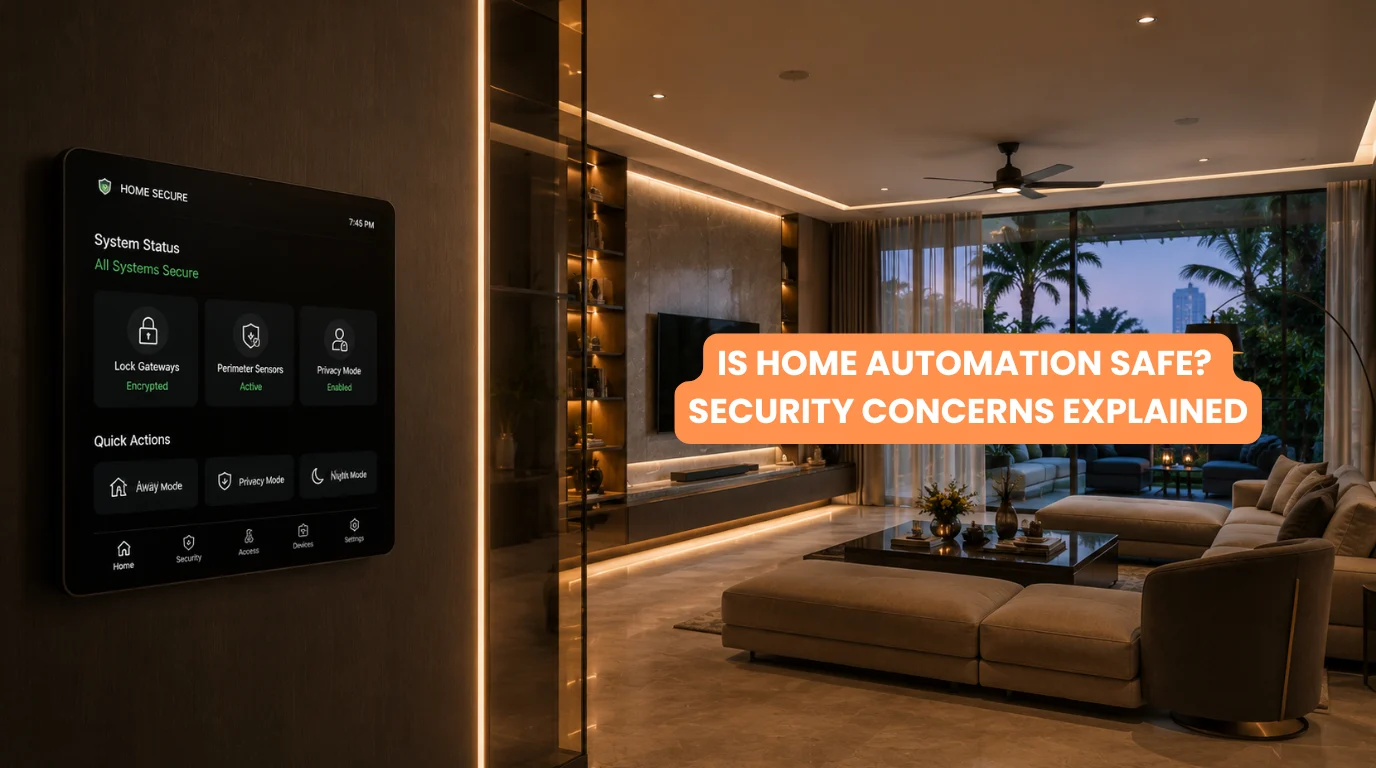
Smart homes manage all your key features such as lighting, climate, security, entertainment, and energy from a single interface.
But as more devices become connected, an important question naturally follows: Is Home Automation Safe?
The short answer is yes when technicians properly design, secure, install, and maintain the system. However, no connected technology is completely risk-free. Smart home systems can introduce cybersecurity, privacy, network, and physical-security considerations that homeowners should understand before installation.
At Techtastic, we believe smart home automation technology should improve security rather than create unnecessary vulnerabilities. That starts with choosing appropriate technology, designing the network correctly, using reputable equipment, and ensuring the system is professionally configured.
Quick Summary
✓ A home automation system can be safe when properly designed and secured.
✓ Connected devices can create cybersecurity and privacy risks.
✓ Weak passwords and unsecured networks are common vulnerabilities.
✓ Security devices like cameras and smart locks require additional protection.
✓ Local-control systems can reduce dependence on cloud services.
✓ Firmware and software updates are important for security.
✓ Wired and hybrid systems can offer strong reliability and control.
✓ Professional installation can reduce configuration mistakes.
✓ Security should be considered from the beginning of the project.
AI Overview
Is Home Automation Safe? Yes, but safety depends on the system’s architecture, home automation devices, network configuration, software, and ongoing maintenance.
Smart home systems can face risks such as unauthorized access, weak passwords, insecure Wi-Fi, outdated firmware, exposure of personal data, and cloud service dependency. Using reputable products, secure networks, strong authentication, regular updates, and professional system design can significantly reduce these risks.
Is Home Automation Safe for a Modern Home?
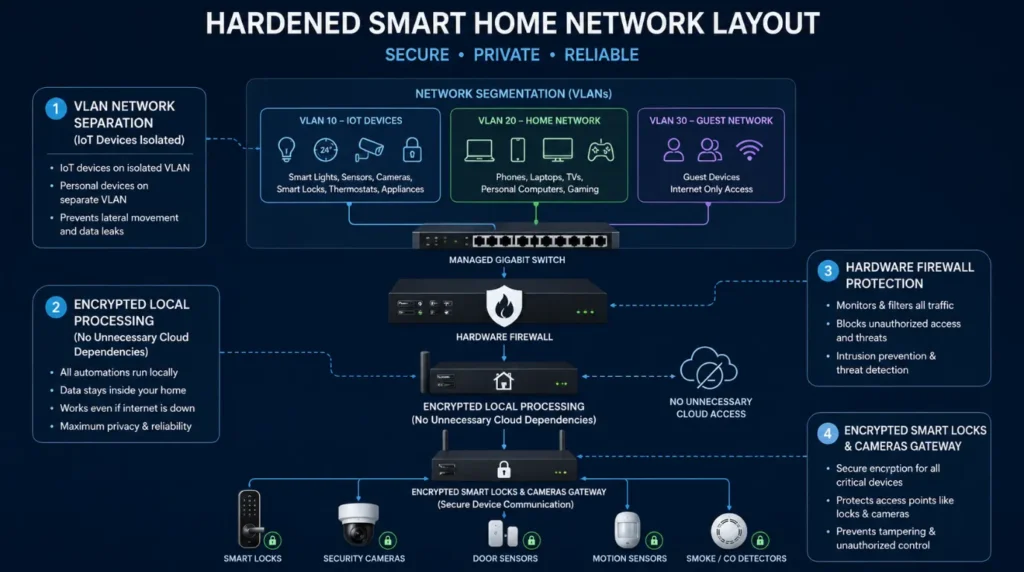
So, is home automation safe for everyday residential use?
Generally, yes. Millions of homes use connected technology for lighting, security, climate control, entertainment, and access control. The important distinction is between having connected devices and having a properly designed connected system.
A homeowner who installs random smart home devices without considering security may create unnecessary vulnerabilities.
A professionally designed system takes a broader approach.
It considers:
- Device security
- Network architecture
- User permissions
- Remote access
- Software updates
- Data privacy
- Physical security
- Backup control methods
This is why the question “Is Home Automation Safe?” should always be followed by another question: How has the system been designed and secured?
1. Cybersecurity Is a Major Consideration
One of the biggest concerns when asking is home automation safe is cybersecurity.
Every connected device potentially creates another point of communication within your home network.
Depending on the system, this could include:
- Smart switches
- Cameras
- Door locks
- Sensors
- Thermostats
- Hubs
- Voice assistants
- TVs
- AV equipment
- Mobile applications
The solution isn’t avoiding connected technology altogether.
Instead, homeowners must select reputable products and properly configure their devices.
2. Weak Passwords Can Create Vulnerabilities
A surprisingly simple security problem is poor password management.
Using the same password across multiple services increases your risk if a hacker compromises one account.
When considering is home automation safe, homeowners should use:
- Strong, unique passwords
- Multi-factor authentication where available
- Secure administrator accounts
- Limited user permissions
- Updated recovery information
Access should also be provided only to people who actually need it.
3. Your Wi-Fi Network Matters
Many smart-home products communicate through Wi-Fi. That means your router and home network become an important part of your overall security architecture.
If you’re asking is home automation safe, don’t evaluate the devices alone. Consider the network supporting them.
Good practices include:
- Using strong Wi-Fi encryption
- Keeping router firmware updated
- Changing default administrator credentials
- Using a secure guest network where appropriate
- Separating certain smart devices from sensitive systems when practical
- Reviewing connected devices regularly
For larger luxury homes, networking should ideally be designed alongside the automation system rather than treated as an afterthought.
4. Smart Cameras and Privacy
Security cameras can make a home safer, but they also create privacy considerations.
This is particularly important when discussing is home automation safe because cameras can collect highly sensitive information about your home and family.
Homeowners should understand:
- Where footage is stored
- Who can access it
- Whether remote viewing is enabled
- How long recordings are retained
- What security controls protect the account
Camera placement also matters.
Bedrooms, bathrooms, and other highly private areas require particularly careful consideration.
5. Are Smart Locks Safe?
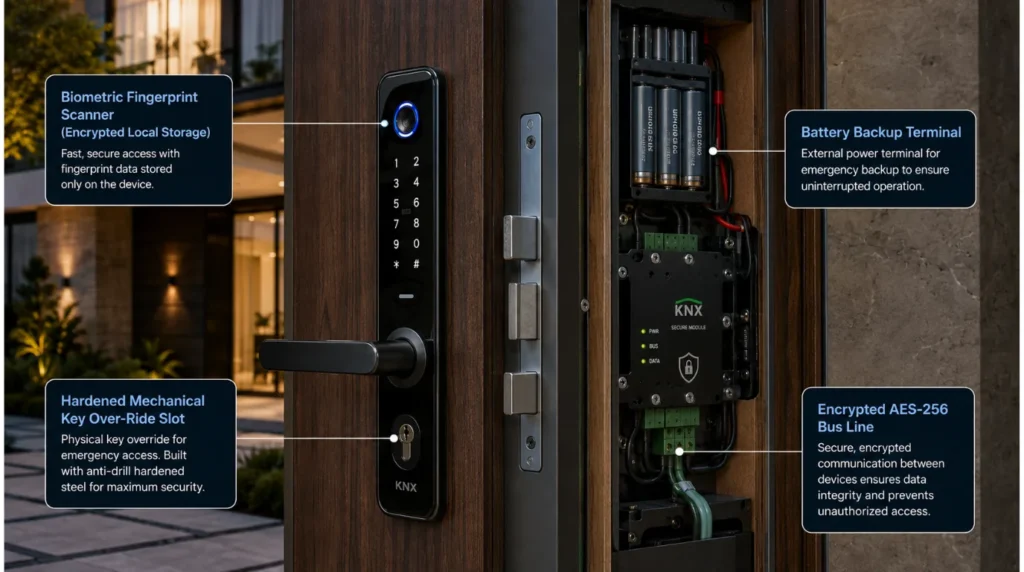
Smart locks can provide convenient keyless access, temporary access codes, activity logs, and remote management. But because smart locks control physical access to your property, you must treat them as a critical security component.
When evaluating is home automation safe, don’t choose smart locks based purely on convenience.
Consider:
- Manufacturer reputation
- Authentication methods
- Mechanical backup
- Battery backup
- Manual override
- Local versus cloud control
- Integration with the wider security system
A good system should have appropriate fallback options if power, connectivity, or a device fails.
6. Cloud Dependency Can Be a Concern
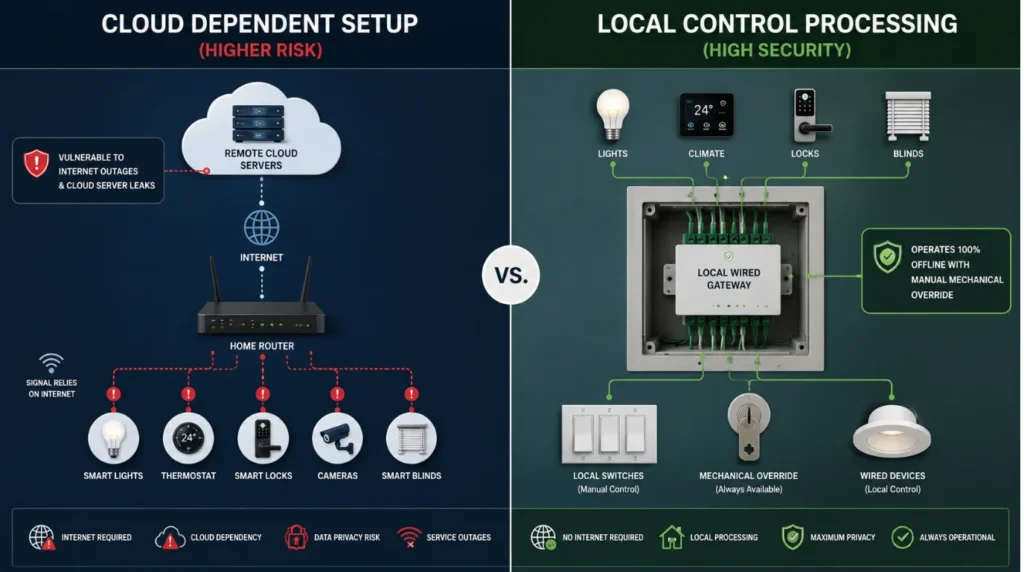
Some smart-home products rely heavily on cloud services. Cloud connectivity can enable remote access, notifications, updates, and convenient integrations.
However, it can also mean that certain features depend on:
- Internet connectivity
- Cloud servers
- Account availability
- Manufacturer software
- Third-party services
This is another reason is home automation safe cannot be answered simply by looking at a product specification, as system architecture matters too. For critical functions, local control can sometimes provide greater resilience than relying entirely on cloud connectivity.
7. Software and Firmware Updates Matter
Smart devices are software-driven products. Manufacturers may release firmware updates to improve functionality, fix bugs, and address security vulnerabilities.
Ignoring updates for years can therefore create unnecessary security risks. If you’re asking is home automation safe, ongoing maintenance should be part of the answer.
Homeowners should know:
- Which devices require updates
- Who manages them
- Whether updates are automatic
- What happens when a manufacturer ends support
- How devices are replaced when necessary
Professional support can make this process considerably easier.
8. Wired vs. Wireless Security
The technology architecture also affects the security conversation.
| Factor | Wired Automation | Wireless Automation |
|---|
| Physical connectivity | Dedicated wiring | Radio/network communication |
| Network dependence | Can reduce reliance on Wi-Fi for controls | Often greater |
| Retrofit flexibility | Lower | Higher |
| New construction | Excellent | Flexible |
| Centralized design | Strong | Depends on ecosystem |
| Maintenance | Often centralized | May involve individual devices |
A wired system such as KNX can provide a robust control infrastructure, particularly when planned during construction. Wireless technology can be extremely useful for retrofits and situations where extensive wiring isn’t practical. A hybrid architecture can combine both approaches.
The right choice depends on the property and requirements.
9. Physical Safety Still Matters
Cybersecurity isn’t the only meaning of “safe.” Home automation also needs to be physically safe.
Electrical installation, motorized curtains, HVAC controls, automated gates, security equipment, and other powered systems should be installed correctly.
Poor installation can create:
- Electrical hazards
- Motor problems
- Equipment damage
- Unexpected automation behavior
- Access-control failures
This is why professional installation and testing are important.
How to Make Home Automation Safer
If you’re still asking is home automation safe, focus on these nine steps:
1. Choose Reputable Products
Don’t select equipment based solely on price. Look for established manufacturers, proper support, security updates, and long-term availability.
2. Secure Your Network
Use strong router credentials, current encryption standards, and appropriate network segmentation.
3. Use Strong Authentication
Avoid default passwords and enable multi-factor authentication where available.
4. Keep Software Updated
Regular updates help maintain security and compatibility.
5. Limit Remote Access
Only enable remote access where it provides meaningful value.
6. Protect Critical Systems
Give additional attention to smart locks, gates, cameras, alarms, and other security-related devices.
7. Maintain Manual Controls
Important functions should have sensible fallback options wherever practical.
8. Plan Before Installation
Design automation, electrical, networking, security, and AV infrastructure together.
9. Work With Experienced Professionals
Professional system design can prevent many avoidable configuration and integration problems.
Is Home Automation Safer Than a Traditional Home?
This depends on what you’re comparing. Automation can potentially improve security through:
- Automated lighting
- Smart door access
- Security cameras
- Motion sensors
- Door/window sensors
- Automated blinds and curtains
- Security alerts
- Occupancy simulation
For example, lighting scenes can make an unoccupied property appear lived in. However, connected systems introduce digital risks that traditional systems may not have.
So the better question isn’t simply is home automation safe. It’s: Can the benefits of automation be achieved while properly managing its digital and physical risks?
With good design, the answer is often yes.
Common Mistakes That Reduce Smart Home Security
The following mistakes can undermine an otherwise good system:
- Using default passwords
- Buying unsupported devices
- Connecting everything to one unsecured network
- Ignoring software updates
- Giving too many people administrator access
- Installing cameras without considering privacy
- Using cheap devices from unknown manufacturers
- Depending entirely on internet connectivity
- Failing to plan backup controls
- Installing equipment without professional configuration
Avoiding these mistakes can significantly improve the overall security of a smart home.
Key Takeaways
So, is home automation safe? Yes, provided you build a complete, secure technology system instead of piecing together cheap smart gadgets.
The biggest areas to consider are:
- Cybersecurity
- Wi-Fi and network security
- Data privacy
- Smart locks
- Security cameras
- Cloud dependency
- Software updates
- Physical installation
- Long-term manufacturer support
The safest smart home isn’t necessarily the one with the most technology. A safe smart home is one where engineers properly select, integrate, secure, and maintain the technology.
Frequently Asked Questions
1. Is Home Automation Safe from Hackers?
A. No connected system can guarantee zero risk, but reputable equipment, strong authentication, secure networking, software updates, and professional configuration can significantly reduce cybersecurity risks.
2. Is Home Automation Safe for Privacy?
A. Yes, provided homeowners understand what information devices collect, where data stays, who accesses it, and how technicians secure remote access.
3. Is Home Automation Safe During a Power or Internet Outage?
A. It depends on the system. Offline systems keep critical features running locally, while cloud-dependent devices lose core functions without an internet connection.
4. Is Home Automation Safe for Children?
A. Properly configured automation can improve safety through controlled access, lighting, sensors, and monitoring. However, automated doors, gates, blinds, and other moving equipment should be installed with appropriate safety measures.
5. Is Home Automation Safe for Smart Locks?
A. Smart locks can be secure when properly selected and configured. Look for reputable manufacturers, strong authentication, backup power, mechanical overrides, and appropriate access controls.
6. Is Home Automation Safe Without Wi-Fi?
A. Some automation systems can continue operating locally without Wi-Fi, depending on their architecture. Wired systems and appropriately designed local-control systems can reduce reliance on wireless connectivity.
7. Is Home Automation Safe for a Luxury Home?
A. Yes. In fact, larger properties can benefit from professionally designed automation for security, lighting, HVAC, access control, and energy management. However, larger systems require more careful infrastructure and network planning.
8. Is Home Automation Safe in the Long Term?
A. It can be, provided devices remain supported, software is updated, components are maintained, and the system can evolve as technology changes.
9. Is Home Automation Safe if Different Brands Are Used?
A. It can be, but compatibility and security should be evaluated before installation. A professional integrator can determine how different systems should communicate and which devices should remain isolated.
10. Is Home Automation Safe Enough for Security-Critical Functions?
A. Home automation enhances security, but critical systems need redundant controls, manual overrides, secure access, and professional installation instead of a single connected device.
Collaboration Opportunities for Architects & Interior Designers
Security and automation should be considered during the architectural and interior-design stage.
Techtastic can collaborate with architects, interior designers, builders, and developers to coordinate:
- Smart lighting
- Security systems
- Access control
- Motorized curtains
- HVAC automation
- Sensor placement
- Home theater systems
- Networking infrastructure
- Equipment locations
Early planning helps hide infrastructure while ensuring the technology remains accessible for maintenance and future upgrades.
Areas We Serve
Techtastic provides smart home automation solutions across:
Navi Mumbai | Nashik | Lonavla | Sangli
We also undertake suitable projects across the wider Mumbai and Thane region.
Final Verdict: Is Home Automation Safe?
Yes, but safety depends on how the system is designed and managed.
A smart home should not simply connect every device to the internet. It should use the right technology, secure infrastructure, appropriate access controls, reliable equipment, and thoughtful system architecture.
At Techtastic, our approach is to design automation around the home first and technology second.
The goal is simple: A smarter home should also be a safer home.
Contact Techtastic
🌐 Website: Techtastic Website
📞 Phone: 9769145145
📍 Service Areas: Mumbai • Navi Mumbai • Pune • Lonavala • Nashik • Sangli