
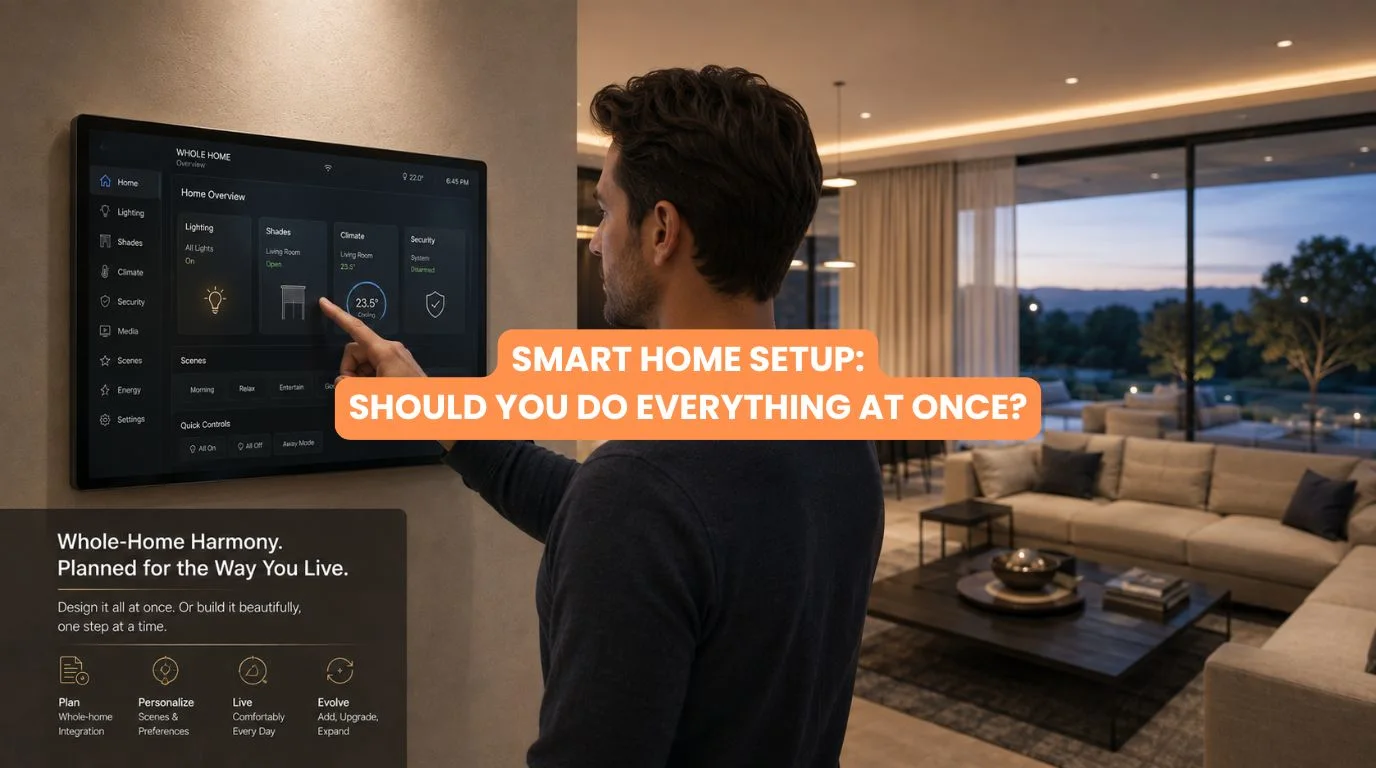
When homeowners decide to automate their homes, one of the first questions is surprisingly difficult:
Smart Home Automation Setup: Should You Do Everything at Once?
Should you automate lighting, curtains, security, HVAC, entertainment, access control, and energy management immediately? Or should you start with a few important systems and expand later?
There isn’t one answer for every property. For a small apartment, starting with a few carefully selected smart features may make perfect sense. For a new luxury villa, design the complete automation infrastructure upfront—even if you activate features in phases.
The key distinction is between installing everything at once and planning everything at once. You don’t necessarily need to purchase smart home devices on day one. But you should understand the future requirements of the property before installing the infrastructure.
This guide explains smart home automation setup, including the advantages and disadvantages of complete versus phased automation, how to approach budgets, and when wired or KNX systems make sense.
Quick Summary
Usually, you don’t need to install every feature immediately for smart home automation setup. However, planning the complete system architecture and infrastructure from the beginning is highly recommended, especially for new homes.
- Plan the whole home early
- Prioritize essential automation
- Install critical infrastructure upfront
- Add non-essential features later if needed
- Consider wired, wireless, or hybrid architecture
- Keep future expansion in mind
- Avoid buying incompatible devices
- Use professional system design for complex projects
The best strategy is often: plan everything, install what you need now, and leave room to expand.
Quick Answer
Smart Home Automation Setup: Should You Do Everything at Once? – Not necessarily.
While homeowners can install smart automation in phases, planning the core infrastructure upfront ensures long-term success:
- New Luxury Builds: Benefit most from early whole-home planning across architecture, wiring, power, and networking.
- Existing Homes: Can start with high-priority systems and scale as needs evolve.
Should You Automate Everything at Once?
The answer to Smart Home Automation Setup: Should You Do Everything at Once? depends on the property and your goals. The two basic approaches are:
Option 1: Complete Installation
Everything is designed and installed at the same time. This might include:
- Lighting
- Curtains
- Security
- HVAC
- Home theatre
- Audio
- Access control
- Energy consumption management
- Sensors
Option 2: Phased Installation
The overall system is planned, but features are installed in stages. For example:
Phase 1: Lighting + infrastructure
Phase 2: Curtains + security
Phase 3: HVAC + entertainment
Both approaches can work.
Crucially, design Phase 1 with future needs in mind so you don’t block yourself out of Phase 2 later.
Planning Everything vs Installing Everything
This is the most important distinction in smart home automation setup.
Plan Everything
Understand:
- Which systems you may eventually automate
- Where sensors might be needed
- Where curtain motors will go
- Network requirements
- Electrical requirements
- Control locations
- Equipment locations
- Future expansion
Install Everything
Actually purchase and install every device immediately. You can often plan everything without installing everything. For a new home, this can be the most practical strategy.
When Should You Do Everything at Once?
A complete installation can make sense when:
You’re Building a New Home
New construction lets you integrate wiring, networking, automation panels, and sensors before finishing the walls and ceilings.
You Want Whole-Home Integration
If lighting, HVAC, curtains, security, and AV all need to work together, designing the system as one project can simplify integration.
You Want Consistent Controls
One unified automation system can provide a more consistent user experience.
You Have a Defined Budget
If the project budget comfortably supports complete automation, installing everything together can reduce future disruption.
When Is Phased Installation Better?
Phasing may be more practical when:
- You’re renovating gradually
- Your budget is limited
- You want to test automation before expanding
- You’re unsure which features you’ll actually use
- You’re upgrading an existing home
- Some rooms aren’t ready
- You want to spread investment over time
A phased strategy isn’t necessarily a compromise. When properly planned, it can be an effective way to build a smart home.
What Should You Install First?
When planning your smart home, start with systems that are difficult or expensive to retrofit later.
1. Infrastructure
Plan:
- Network cabling
- Electrical wiring
- Automation wiring
- Equipment locations
- Control locations
2. Lighting
Lighting is one of the most frequently used automation systems.
3. Motorized Curtains
Curtain power points, tracks, and concealed pockets may need architectural coordination.
4. Security
Plan:
- Cameras
- Sensors
- Access control
- Video door phones
5. HVAC
Coordinate climate-control integration before installation.
Entertainment can often be expanded later depending on the property.
Smart Home Hub Infrastructure Comes First
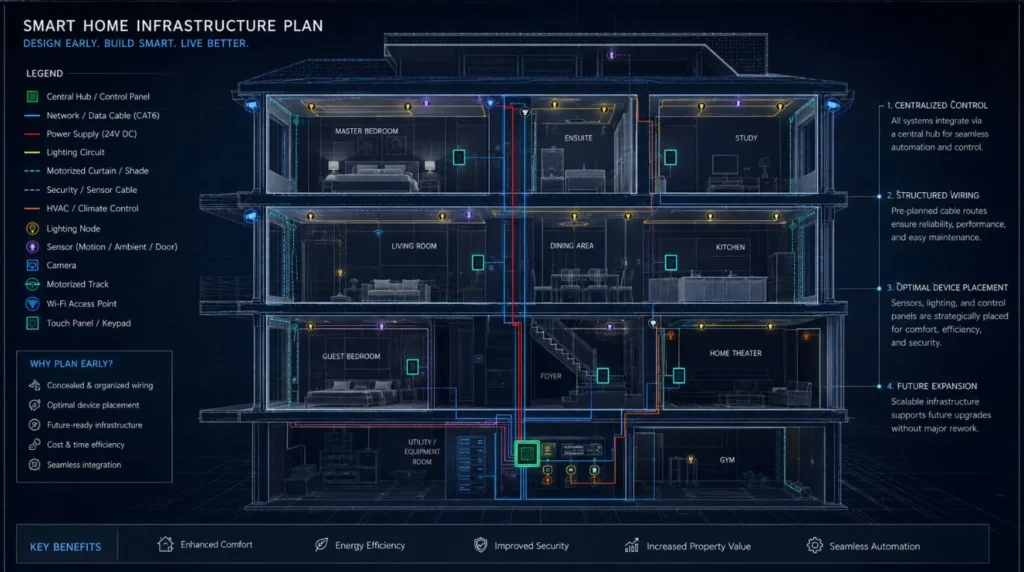
One of the biggest mistakes homeowners make is thinking only about devices. A smart home also needs infrastructure. This can include:
- Electrical circuits
- Network cabling
- Wi-Fi access points
- Automation controllers
- Distribution boards
- Equipment racks
- Power supplies
- Sensor wiring
For new construction, this infrastructure should ideally be considered before electrical and interior work is finalized.
Wired vs Wireless Smart Home Automation Setup
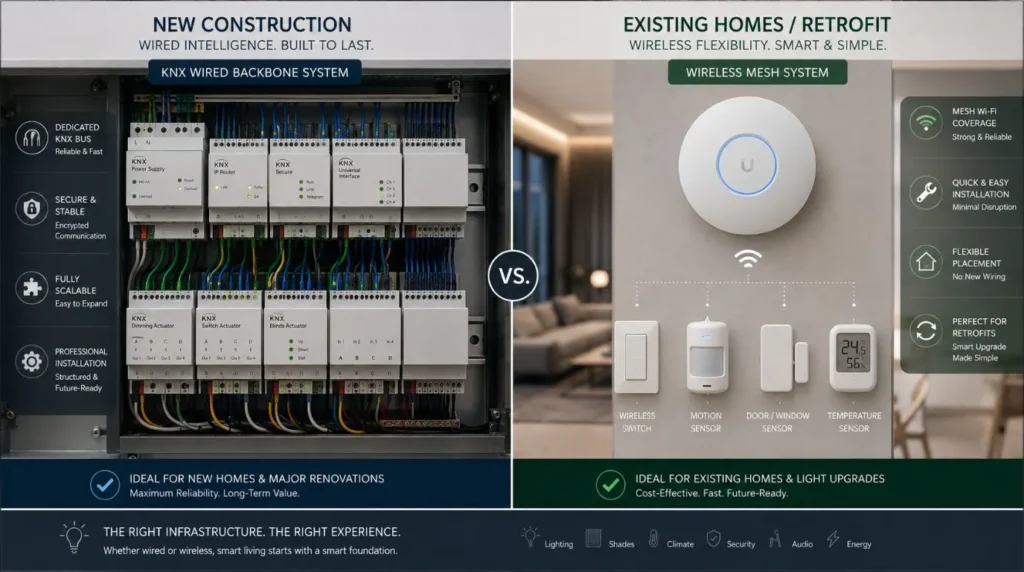
| Factor | Wired Smart Home Automation Setup | Wireless Smart Home Automation Setup |
|---|
| New Construction | Excellent | Good |
| Existing Homes | More difficult | Excellent |
| Large Villas | Excellent | Good with proper network |
| Retrofit | Moderate | Excellent |
| Battery Dependence | Lower | Potentially higher |
| Initial Infrastructure | Higher | Lower |
| Scalability | Excellent | Good |
| Long-Term Planning | Excellent | Good |
| KNX Compatibility | Excellent | Not applicable to purely wireless systems |
A wired KNX system offers maximum reliability and centralized control, making it ideal for large new builds.
Wireless and hybrid systems can be more practical for many existing homes.
Can You Add Smart Home Features Later?
Yes—but not every feature is equally easy to add later.
Easy to Add Later
- Smart speakers
- Some wireless sensors
- Certain smart plugs
- Some wireless switches
- Additional software features
More Difficult to Retrofit
- Concealed wiring
- Ceiling-mounted sensors
- Recessed curtain infrastructure
- Certain wired lighting systems
- Central equipment
- Structured network cabling
This is why Smart Home Automation Setup: Should You Do Everything at Once? should be answered at the infrastructure level.
Plan difficult-to-retrofit elements early.
Smart Home Technology Budget: Complete vs Phased
A complete system requires a larger initial investment. A phased system spreads the investment over time.
| Approach | Initial Investment | Flexibility | Best For |
|---|
| Complete Automation | Higher | Moderate | New luxury homes |
| Phased Automation | Lower | High | Existing homes |
| Hybrid | Moderate | Very High | Most flexible projects |
However, don’t assume that phasing always costs less overall.
If future additions require rewiring, replacing equipment, or changing incompatible devices, the total cost can increase. The goal should be planned phasing, not simply delayed purchasing.
A Three-Phase Smart Home Strategy
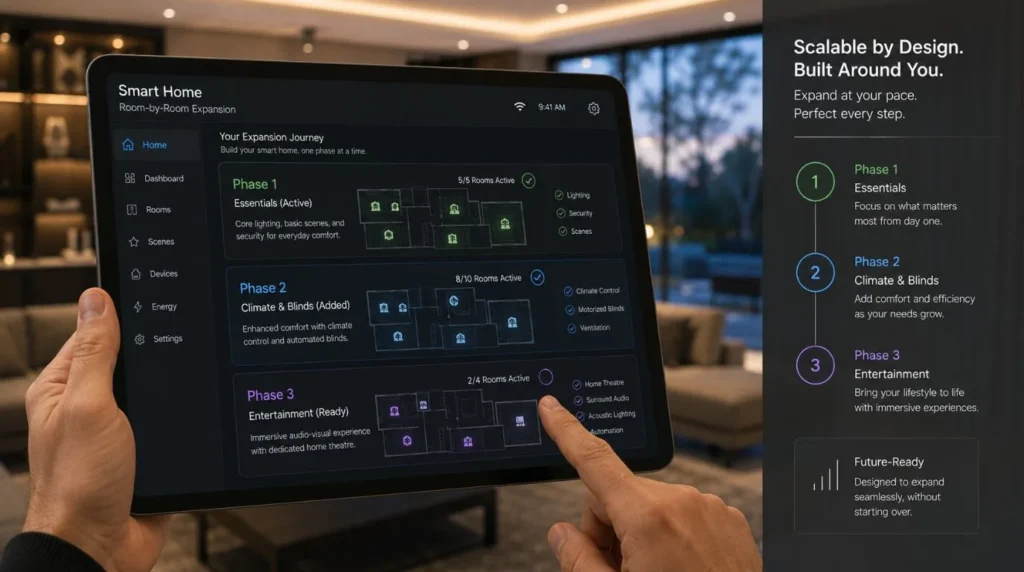
If you’re still deciding on a smart home automation setup, a three-phase approach can work well.
Phase 1: Infrastructure + Essentials
Install:
- Core networking
- Electrical infrastructure
- Automation backbone
- Essential lighting
- Key security systems
Phase 2: Comfort Automation
Add:
- Motorized curtains
- HVAC automation
- Advanced lighting scenes
- Additional sensors
Phase 3: Lifestyle Automation
Add:
- Home theatre
- Multi-room audio
- Energy management
- Advanced scenes
- Additional rooms
The important part is that Phase 1 was designed with Phases 2 and 3 in mind.
Example: Luxury Villa
Illustrative Example: This is a planning example, not a specific Techtastic client project.
Imagine a new 5-bedroom luxury villa. The homeowner initially wants:
- Lighting
- Curtains
- Security
But they may eventually want:
- HVAC integration
- Home theatre
- Multi-room audio
- Energy management
Instead of planning for just a few immediate features, design the automation architecture around the entire property’s future needs.
The homeowner installs the priority systems initially. Later, additional functions can be integrated without redesigning the entire system. That’s the advantage of planned scalability.
Should You Automate Every Room?
Not necessarily. Some rooms benefit more from automation than others.
High Priority
- Living room
- Master bedroom
- Home theatre
- Entrance
- Kitchen
- Outdoor entertainment areas
Medium Priority
- Guest bedrooms
- Study
- Dining room
Lower Priority
- Storage
- Utility areas
- Occasionally used rooms
The right approach depends on how your household actually uses the property.
Smart Home Automation Setup Decision Matrix
If you’re still asking Smart Home Automation Setup: Should You Do Everything at Once?, use this simple matrix –
| Your Situation | Recommended Approach |
|---|
| New luxury villa | Plan everything; install most core systems together |
| New apartment | Plan complete system; phase optional features |
| Existing apartment | Start with high-value wireless/retrofit features |
| Major renovation | Plan infrastructure early; automate priority rooms |
| Limited budget | Phase the system carefully |
| Whole-home KNX project | Design the complete architecture upfront |
| Unsure about automation | Start with essential systems and expand |
Common Mistakes to Avoid While Smart Home Automation Setup
Buying Devices First
This can create compatibility problems.
Treating Every Smart Device as Equal
Different products have different capabilities and lifespans.
Ignoring Infrastructure
Retrofitting wiring later can be expensive.
Choosing the Cheapest System
Initial price isn’t the same as long-term value.
Not Planning Expansion
You may eventually want more automation than you originally expected.
Using Too Many Platforms
Multiple disconnected apps can make the system harder to use.
Automating Everything Automatically
Good automation should improve your lifestyle, not remove all manual control.
What About Maintenance?
Phased systems can sometimes introduce more maintenance complexity if they combine products from different ecosystems over time.
A unified system can make:
- Updates
- Troubleshooting
- Programming
- User support
easier.
However, a well-planned phased system can also remain highly manageable.
The key is documenting the architecture and ensuring every addition is compatible with the existing system.
Future-Proofing Your Smart Home
Technology changes. The system you install today may eventually need:
- New devices
- New integrations
- Updated software
- Additional rooms
- New control interfaces
Future-proofing doesn’t mean predicting every technology that will exist. It means creating an infrastructure that gives you options.
This includes:
- Adequate network capacity
- Spare infrastructure where practical
- Scalable automation
- Compatible technology
- Accessible equipment
- Good documentation
Our Recommendation
So, Smart Home Automation Setup: Should You Do Everything at Once?
Our recommendation is:
Plan everything. Install the essentials. Expand intelligently.
If you’re building a new luxury home, plan the complete automation architecture before construction reaches the electrical and interior stages. You don’t necessarily need to buy every smart device immediately. But you should know where future systems will connect.
For an existing home, start with the features that provide the greatest everyday value.
For example: Lighting → Curtains → Security → Climate → Entertainment
This creates a natural path toward whole-home automation.
Techtastic designs expandable automation systems so you don’t have to decide everything on day one.
Key Takeaways: Smart Home Automation Setup
- Planning the complete system upfront is often more important than installing every feature immediately.
- New construction benefits significantly from early automation planning.
- Existing homes can often use a phased or hybrid approach.
- Install infrastructure that would be difficult to retrofit later.
- Prioritize lighting, security, curtains, and climate based on your needs.
- A KNX system can provide a strong foundation for large new-build projects.
- Avoid mixing incompatible products simply to save money.
- Plan future expansion before starting Phase 1.
- The best approach is usually to plan everything, install strategically, and expand when needed.
Frequently Asked Questions
1. Should I install my entire smart home automation setup at once?
Not necessarily. You can phase the smart home automation setup, but the overall architecture and infrastructure should ideally be planned from the beginning.
2. Is it cheaper to install everything at once?
It can reduce duplicated installation work, but the answer depends on the project. A phased installation can spread costs but may become more expensive if future retrofits require significant infrastructure changes.
3. Can I add smart home features later?
Yes. Wireless devices and software-based features can often be added relatively easily. Concealed wiring, sensors, curtain infrastructure, and some wired systems are more difficult to retrofit.
4. What should I install first?
Start with hard-to-retrofit infrastructure, then add high-value features like lighting, security, motorized curtains, and climate control.
5. Should I choose KNX for a new luxury home?
KNX can be a strong option for large new-build homes requiring structured, scalable, professional automation. The appropriate system should be selected based on the property’s requirements.
6. Can I mix wired and wireless smart home systems?
Yes. A hybrid approach can combine the reliability and infrastructure advantages of wired automation with the flexibility of wireless devices.
7. What if I don’t know which smart features I’ll want in the future?
Plan the infrastructure for potential expansion while installing only the features you currently need.
8. Is phased smart home installation reliable?
The system remains reliable as it grows if you design the original architecture for expansion.
9. Should I hire a smart home installer before construction?
Involving an automation specialist early in new construction streamlines key setups: Wiring and network layout, Sensor placement and equipment hubs, and Lighting, motorized curtains, and HVAC integration.
10. What’s the biggest mistake when setting up a smart home?
Buying individual devices without first deciding how the complete system will communicate and operate together.
Collaboration Opportunities for Architects & Interior Designers
Deciding whether to do the smart home automation setup at once becomes much easier when you coordinate system planning with your architectural and interior design.
Techtastic can collaborate with:
- Architects
- Interior Designers
- Builders
- Developers
- Luxury Villa Developers
- Project Management Consultants
Services include:
- Smart Home Planning
- KNX System Design
- Smart Lighting
- Motorized Curtain Planning
- HVAC Integration
- Smart Security
- Home Theatre Automation
- Structured Networking
- Technical Drawings
- Programming
- Testing & Commissioning
Early coordination lets you integrate smart home infrastructure into the architecture before interior work begins.
Areas We Serve
Techtastic provides smart home automation solutions across: Navi Mumbai • Nashik • Lonavla • Sangli
The company also serves projects across the wider Mumbai and Thane region.
Ready to Plan Your Smart Home?
If you’re asking Smart Home Automation Setup: Should You Do Everything at Once?, don’t think of the decision as simply “everything” versus “nothing.”
A better strategy is: Plan the whole system → Install the essential infrastructure → Automate your priorities → Expand when needed.
This gives you the flexibility to control your initial investment without sacrificing your home’s long-term automation potential. Whether you’re building a luxury villa, renovating an apartment, or upgrading your home, Techtastic helps you plan what to install today and add tomorrow.
Talk to Techtastic about designing a smart home automation setup that can grow with you.
Contact Techtastic
Website: Techtastic Website
Call / WhatsApp: 9769145145
Service Areas: Navi Mumbai • Nashik • Lonavla • Sangli