
One of the most common misconceptions about smart homes is that automation is all about devices. Homeowners often focus on:
- Smart lights
- Security systems
- Motorized curtains
- Climate control
- Entertainment systems
However, once these technologies are installed, an important question emerges: How do you control everything easily?
At Techtastic, we often tell homeowners that the true smart home experience isn’t just about automation—it’s about simplicity. This is where the KNX smart home control panel and visualization system become incredibly important.
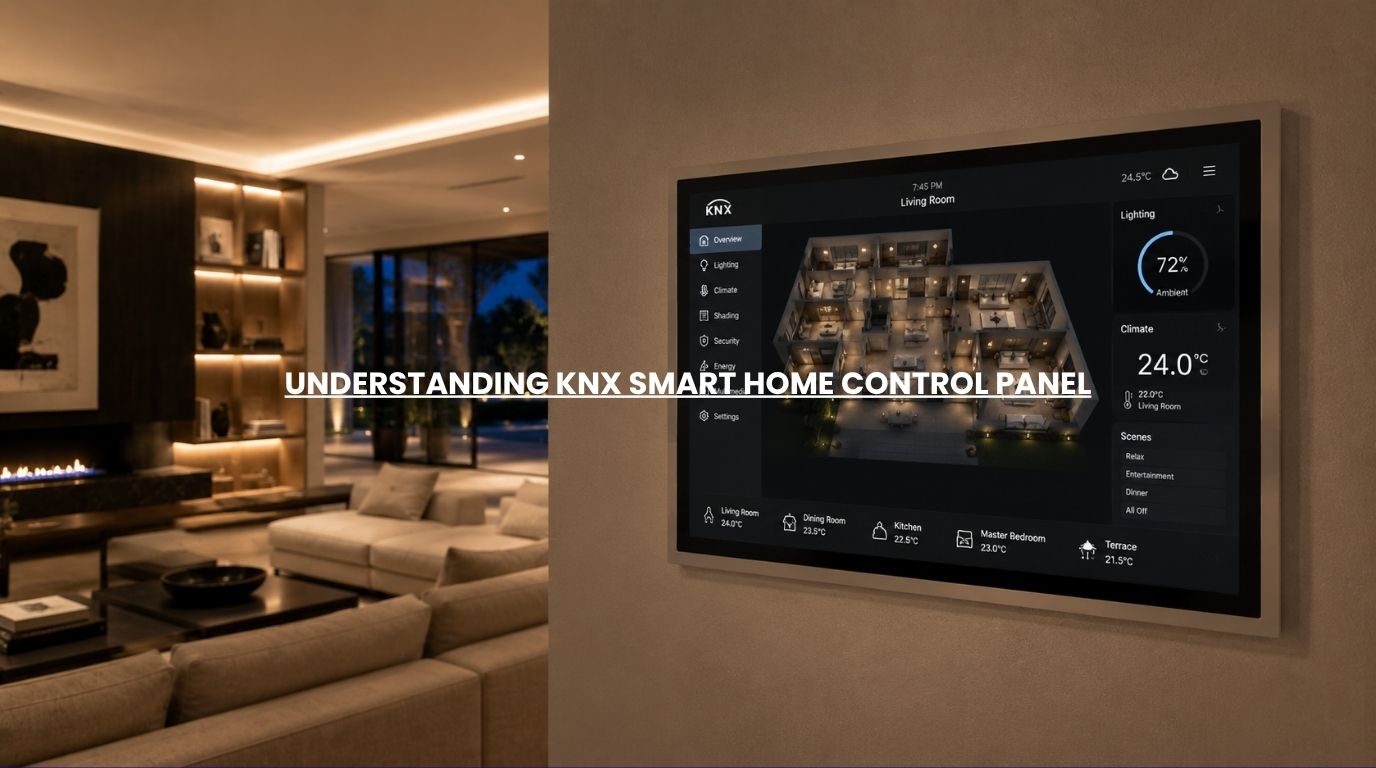
A well-designed KNX visualization interface transforms a complex network of devices into a simple, intuitive experience where homeowners can manage their entire property from a single screen.
Whether you’re building a luxury residence, planning a smart villa, or exploring home automation for the first time, understanding KNX smart home control panel and visualization is essential to creating a smart home that is both powerful and easy to use.
Summary
A KNX smart home control panel and visualization system provides centralized control for smart home technologies such as lighting, climate control, security, motorized curtains, access control, and entertainment systems. Instead of managing multiple apps and devices separately, homeowners can use touch panels, smartphones, tablets, or dashboards to monitor and control their entire property through a unified interface. KNX smart home control panel and visualization improve convenience, usability, automation management, and overall smart home experiences while supporting future scalability.
Quick Answer
A KNX smart home control panel and visualization system act as the user interface for a smart home. It allows homeowners to monitor and control lighting, climate, security, curtains, entertainment, and automation scenes from a centralized dashboard. Rather than using separate apps for each device, KNX smart home control panel and visualization bring everything together into one intuitive interface, making smart homes easier to manage, more efficient, and more user-friendly.
What Is a Smart Home Control Panel?
A smart home control panel is a centralized interface that allows homeowners to interact with their automation systems.
Think of it as the command center of the home.
Depending on the installation, a smart home control panel may provide access to:
- Lighting control
- Climate management
- Security monitoring
- CCTV cameras
- Smart locks
- Motorized curtains
- Home theatres
- Energy management
- Automation scenes
Instead of controlling each system individually, everything is accessible from a single location.
What Is KNX Visualization?
KNX visualization refers to the graphical interface that displays and controls automation functions within a KNX smart home.
Visualization can be accessed through:
- Wall-mounted touch panels
- Smartphones
- Tablets
- Desktop dashboards
- Dedicated control screens
The purpose is to make sophisticated automation systems simple and intuitive for everyday users.
Why KNX Visualization Matters
A smart home may contain hundreds of devices.
Without proper visualization:
- Controls become fragmented.
- User experiences become inconsistent.
- Automation becomes harder to manage.
Visualization solves this problem by creating a unified experience.
Rather than thinking about devices, homeowners interact with rooms, scenes, and activities.
What Can You Control Through a KNX Smart Home Control Panel?
Smart Lighting
Control:
- Individual lights
- Entire rooms
- Dimming levels
- Lighting scenes
- Scheduled events
Examples include:
- Good Morning mode
- Dinner mode
- Movie mode
- Night mode
Climate Control
Monitor and adjust:
- Room temperatures
- HVAC settings
- Fan speeds
- Energy usage
This improves comfort and efficiency.
Motorized Curtains & Blinds
Manage:
- Curtain positions
- Shading schedules
- Daylight control
- Privacy settings
Automation can be adjusted with a single touch.
Security Systems
View and control:
- CCTV cameras
- Motion sensors
- Smart locks
- Alarm systems
- Access control systems
Security information becomes immediately accessible.
Entertainment Systems
Control:
- Home theatres
- Audio zones
- Media systems
- Streaming devices
This creates a seamless entertainment experience.
Types of KNX Visualization Interfaces
Wall-Mounted Touch Panels
These are often installed in:
- Living rooms
- Master bedrooms
- Entrances
- Home offices
Advantages include:
- Dedicated access
- Large display area
- Elegant appearance
- Centralized control
They are particularly popular in luxury homes.
Smartphone Apps
Mobile access allows homeowners to control systems from virtually anywhere.
Benefits include:
- Remote access
- Notifications
- Convenience
- Security monitoring
This is often the most frequently used interface.
Tablets
Many homeowners dedicate tablets as home control stations.
Advantages include:
- Larger screen size
- Portable control
- Detailed visualization
Desktop Dashboards
Desktop interfaces are often used in:
- Commercial spaces
- Large residences
- Facility management applications
They provide extensive monitoring capabilities.
Why Homeowners Prefer Centralized Visualization
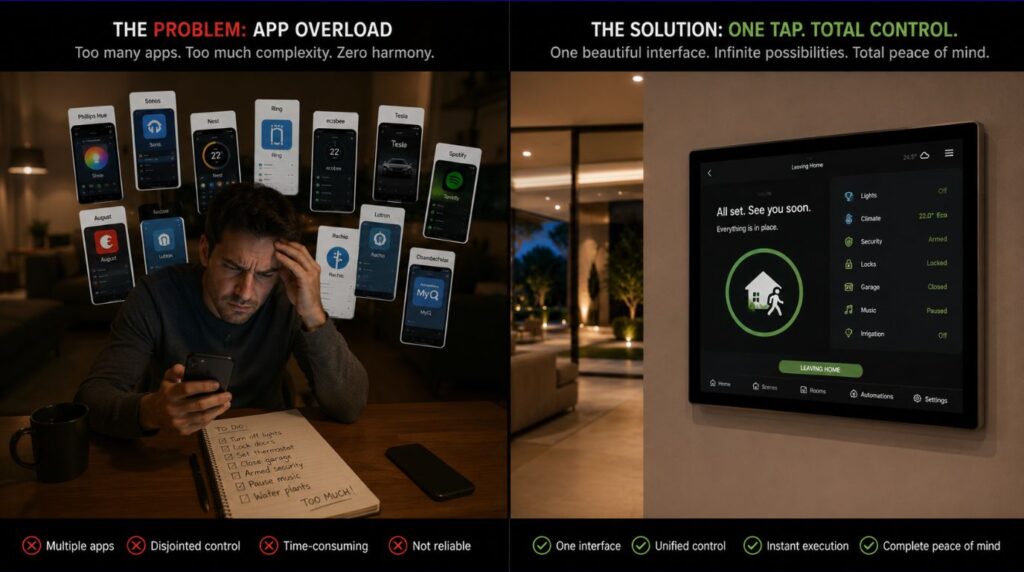
Without centralized control:
- Lighting uses one app.
- Security uses another.
- Climate control uses another.
- Curtains use another.
Managing multiple systems becomes frustrating.
A unified visualization platform eliminates this complexity.
Benefits include:
- Simpler control
- Better user experience
- Faster operation
- Greater visibility
The entire home becomes easier to manage.
Real-Life KNX Visualization Scenarios
Leaving Home
One button can:
- Turn off the lights.
- Lower HVAC usage.
- Lock doors.
- Arm security systems.
- Close curtains.
Good Morning Scene
A single scene can:
- Open curtains.
- Adjust lighting.
- Set temperature.
- Start music.
Vacation Mode
Visualization allows homeowners to:
- Monitor security cameras.
- Adjust schedules.
- Review alerts.
- Control systems remotely.
All from a single dashboard.
KNX Visualization vs Individual Smart Device Apps
| Individual Apps | KNX Visualization |
|---|---|
| Multiple interfaces | Single interface |
| Fragmented control | Centralized control |
| Inconsistent user experience | Unified experience |
| Limited automation visibility | Complete system visibility |
| Device-focused | Lifestyle-focused |
The difference becomes increasingly important as smart homes grow.
Common Features of Modern KNX Visualization Systems
Today’s interfaces often include:
- Interactive floor plans
- Room-based navigation
- Live camera feeds
- Energy monitoring
- User profiles
- Scene management
- Voice assistant integration
- Remote access capabilities
These features make smart homes significantly easier to operate.
Why Visualization Matters for Luxury Homes
Luxury residences often include:
- Dozens of lighting circuits
- Multiple climate zones
- Extensive security systems
- Motorized shading
- Entertainment systems
Without visualization, managing these technologies becomes cumbersome.
A well-designed interface creates a premium user experience that matches the sophistication of the property itself.
Why It Matters for Modern Homes
Today’s homeowners expect technology to feel intuitive.
The best smart homes:
- Require minimal effort
- Provide immediate visibility
- Simplify daily routines
- Enhance comfort
- Improve security
KNX visualization helps achieve these goals by transforming complex automation into a simple user experience.
Our Perspective at Techtastic
At Techtastic, we believe a smart home is only as good as its user experience.
Even the most advanced automation system can feel frustrating if the controls are difficult to use.
This is why we place significant emphasis on:
- Visualization design
- User interface simplicity
- Room-based control
- Personalized experiences
- Future scalability
We’ve found that homeowners derive the greatest value from smart homes when technology becomes intuitive and nearly invisible.
A thoughtfully designed KNX visualization system plays a major role in achieving that outcome.
Collaboration Opportunities for Developers, Architects & Interior Designers
The best control experiences are planned during the design phase.
At Techtastic, we collaborate with:
- Architects
- Interior designers
- Luxury home builders
- Real estate developers
- Hospitality consultants
Smart Control Planning
Design intuitive interfaces that complement architectural layouts.
Touch Panel Placement Strategy
Optimize accessibility and usability.
Integrated Automation Design
Create seamless control experiences throughout the property.
User Experience Planning
Ensure technology remains simple and intuitive.
Luxury Residential Projects
Deliver premium smart living experiences.
Hospitality & Commercial Spaces
Implement scalable control and visualization solutions.
Early planning results in better aesthetics, functionality, and user satisfaction.
Key Takeaways
- KNX visualization provides centralized smart home control.
- A smart home control panel simplifies management of complex automation systems.
- Lighting, security, climate, entertainment, and curtains can be managed through one interface.
- Visualization improves user experience and automation visibility.
- Wall-mounted touch panels and mobile apps are the most common interfaces.
- A well-designed smart home control panel makes smart homes easier and more enjoyable to use.
Frequently Asked Questions
1. What is KNX visualization?
A: KNX visualization is the graphical interface used to monitor and control smart home systems connected through KNX automation.
2. What does a KNX smart home control panel do?
A: A KNX smart home control panel provides centralized access to lighting, security, climate control, entertainment systems, and automation scenes.
3. Can I control my KNX system from my phone?
A: Yes. Most KNX visualization systems support smartphone and tablet access.
4. Is a KNX smart home control panel necessary?
A: While not mandatory, a KNX smart home control panel significantly improves usability and centralized control.
5. Can KNX visualization display security cameras?
A: Yes. Many visualization platforms support live CCTV monitoring and security management.
6. What is the difference between KNX visualization and a smart home app?
A: KNX visualization typically provides a unified interface that controls multiple systems rather than individual devices.
7. Can KNX visualization be customized?
A: Yes. Interfaces can often be tailored to the homeowner’s preferences and property layout.
8. Is KNX visualization suitable for luxury homes?
A: Absolutely. Visualization systems are particularly valuable in larger and more sophisticated smart home environments.
Conclusion
A smart home is not just about automation—it’s about creating a seamless and intuitive living experience. KNX control panels and visualization systems serve as the bridge between advanced technology and everyday usability, allowing homeowners to manage their entire property through a single, elegant interface.
At Techtastic, we help homeowners, architects, and developers design visualization experiences that make smart homes easier to control, more enjoyable to use, and better prepared for future growth.
📞 Call/WhatsApp: 9769145145
📍 Our Operational Hubs: Navi Mumbai | Nashik | Lonavla | Sangli
Whether you’re planning a new automation project or upgrading an existing smart home, investing in thoughtful KNX visualization can dramatically enhance the overall experience.
Want to ensure your system investment is fully protected? Head over to our deep dive on KNX Security Integration: Smarter Home Protection Explained (2026) to learn how we future-proof your smart home infrastructure.